
VAT Registers
Review Sales, Purchases, Reverse Charge, Receipts, OSS and VAT Summary views where applicable. Bill registration dates may differ from supplier document dates.
Open this screen
Reports → VAT Registers when present in your company's catalogue, or its supported parent-report drilldown.
When it is available
Available to users whose company roles permit this work. Country, subscription, company settings and the saved record's state can narrow the available controls.
QuickBooks connection
This screen prepares or displays work in FOR; opening it does not write to QuickBooks. Where a later step creates an accounting document, that step is identified separately. FOR:CEO never sends its accounting entries to QuickBooks.
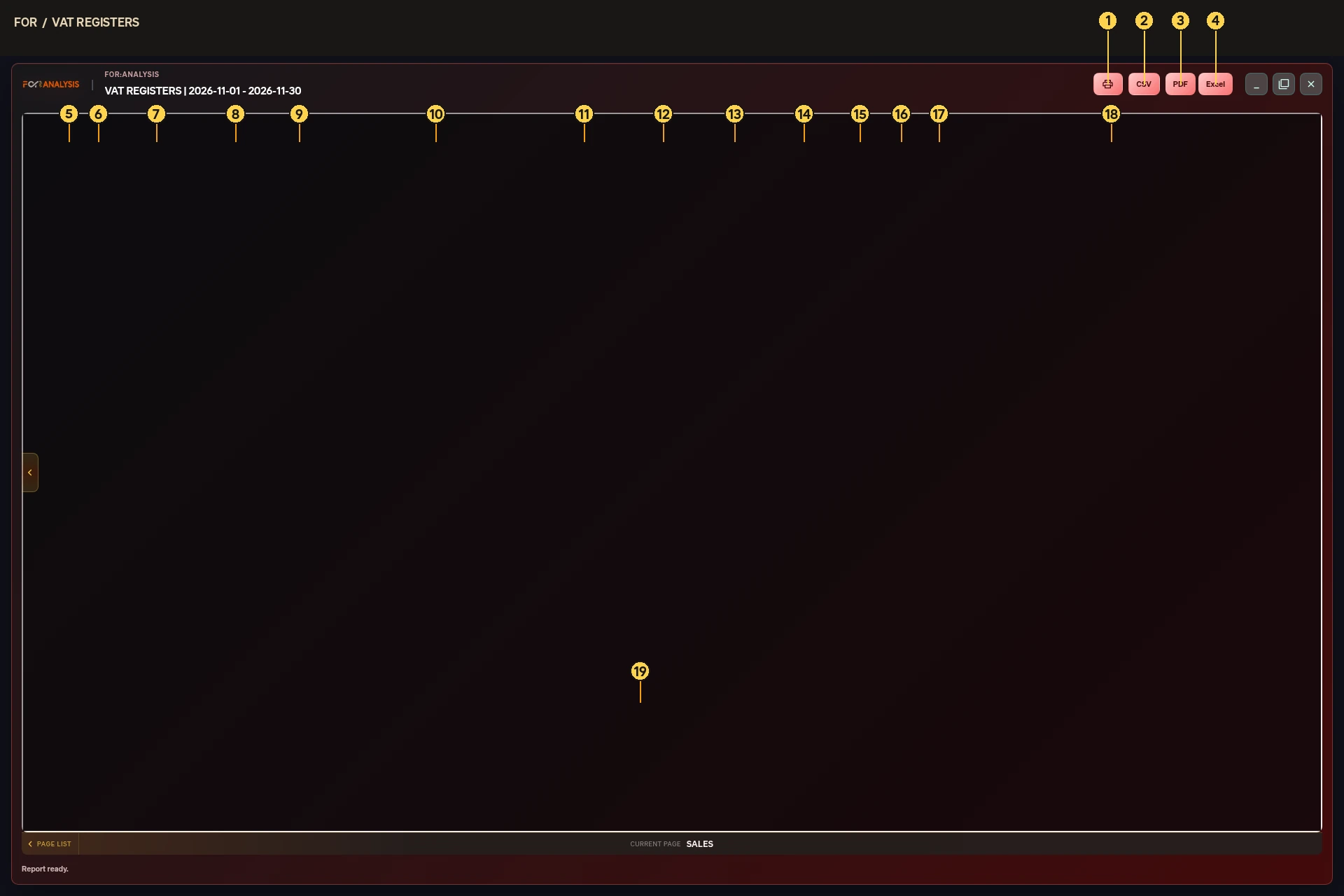
- 1
Print report to PDF · printer
Open the browser's print flow for the interactive report and its current filters, then choose the browser's PDF destination if required. This is separate from the dedicated paginated PDF/Excel buttons and is not a guarantee of a complete legal-format register export.
- 2
CSV / visible data
Export the supported interactive data selection. Visible-data exports have row/visual limits and are not a substitute for a full paginated compliance export.
- 3
PDF / Legal Format PDF
Use the offered paginated PDF for the selected view and filters when available. It is different from the interactive visible-page PDF. A rendering error must be resolved, not silently treated as a successful alternate file.
- 4
Excel / Legal Format Excel
Export the supported paginated result with the same filters. Excel is not offered by every report; the budget-template workbook is not an actual-versus-budget report export.
- 5
Prot#
The register sequence assigned to the document in its accounting context. Read it together with the line number and period; it is not the supplier's invoice number.
- 6
Ln
The line's position within its document or register. It is not a standalone document count, and a document can legitimately occupy several rows.
- 7
Doc#
The business number or reference of the row's source document. Numbers can repeat across document types or years, so use type, party, date and the supported link to identify the exact record.
- 8
Reg.Date
The VAT registration date used for the selected register period. A received bill can legitimately have a registration date later than its supplier document date; inspect the source before calling the row missing.
- 9
Doc.Date
The source document's date. It is distinct from payment due date, actual payment date and any separately displayed VAT registration date.
- 10
Account
The actual ledger account behind the row. Open its supported detail to inspect the movements; a parent heading and its child accounts must not be added together a second time.
- 11
VAT #
The party's fiscal identity as represented in this register, distinct from the document number or product tax code. Review missing/incorrect identity at the source.
- 12
Total Amount
Read this value at the row's stated level and in its displayed currency. A document total, line amount, account balance and stock carrying value are different measures; the report title and neighboring columns identify which one is shown. Do not add a subtotal to its own detail again.
- 13
Net Amount
The net taxable or income basis in this register's stated context. In the withholding return it is the relevant income amount, not the bank amount after withholding.
- 14
VAT Amount
The VAT amount for the included register rows and their recorded treatment. Read the register and any reverse-charge/non-deductible context before combining totals.
- 15
Nature
The legal zero-rate/non-taxable category supplied by the applicable fiscal treatment. Different reasons are not interchangeable merely because their numerical rate is zero.
- 16
VAT %
The percentage associated with the reported treatment. A zero percentage alone does not explain the legal exemption or exclusion; read Nature and VAT Description.
- 17
RC %
The reverse-charge rate used for the corresponding register treatment. It is not a second supplier-charged percentage to add to the payable.
- 18
VAT Description
The named tax treatment on the source line. Use it to distinguish ordinary tax, exemptions, reverse charge and other supported cases; do not classify a transaction from its rate alone.
- 19
RC VAT Amount
The reverse-charge tax amount for this register context. Read the corresponding purchase/sales treatment without counting the same effect twice.
How to work here
Review Sales, Purchases, Reverse Charge, Receipts, OSS and VAT Summary views where applicable. Bill registration dates may differ from supplier document dates.
- Verify the company, report title and available date basis before opening.
- Read the selected page and its filters; inspect source detail for a balance or amount requiring explanation.
- Export only through the formats actually offered, preserving the view and period. Read-only reporting makes no QuickBooks writes.
Pages and drilldown views
The published English report uses these page captions: REVERSE CHARGE, SALES, SPECIAL-1, PURCHASES, RECEIPTS, SUMMARY, OSS. Use the report's page selector for offered pages; contextual detail views can require opening a linked amount or source from their parent. The window title identifies the report even when a page retains a shortened caption.
Every field and control
Use the exact label or hover over an icon to match it to this reference. A missing action is not the same as an empty field: check its availability below.
Use only the period modes offered for this report. A period report measures a span; an As of report is a closing snapshot. Preserve the selected dates when following drilldown and export.
Availability: Shown when the corresponding workflow and your permissions allow it; review required markers and any disabled-state explanation.
Open report / Apply period
ActionLoad the selected company/report/view with the reviewed date choice. If the requested period is too large, narrow it or use the offered calendar period; no invisible truncation should be assumed.
Availability: Only when offered by the current screen, role and saved workflow state. Read any confirmation before proceeding.
Select the intended statement/register/detail view. A changed page can expose different measures and filters; check the heading before interpreting totals.
Availability: Shown when the corresponding workflow and your permissions allow it; review required markers and any disabled-state explanation.
Review active filters such as account, customer, state, register or project. Clear only the intended display filter; company access stays fixed. A filtered subtotal is not automatically the whole-company total.
Availability: Shown when the corresponding workflow and your permissions allow it; review required markers and any disabled-state explanation.
Follow a supported linked amount to its transaction detail or a document link to the actual authorized form. The selected company, period and group context should travel with it; a read-only report does not grant document editing.
Availability: Only when offered by the current screen, role and saved workflow state. Read any confirmation before proceeding.
PDF / Legal Format PDF
ActionUse the offered paginated PDF for the selected view and filters when available. It is different from the interactive visible-page PDF. A rendering error must be resolved, not silently treated as a successful alternate file.
Availability: Only when offered by the current screen, role and saved workflow state. Read any confirmation before proceeding.
Excel / Legal Format Excel
ActionExport the supported paginated result with the same filters. Excel is not offered by every report; the budget-template workbook is not an actual-versus-budget report export.
Availability: Only when offered by the current screen, role and saved workflow state. Read any confirmation before proceeding.
CSV / visible data
ActionExport the supported interactive data selection. Visible-data exports have row/visual limits and are not a substitute for a full paginated compliance export.
Availability: Only when offered by the current screen, role and saved workflow state. Read any confirmation before proceeding.
Open the browser's print flow for the interactive report and its current filters, then choose the browser's PDF destination if required. This is separate from the dedicated paginated PDF/Excel buttons and is not a guarantee of a complete legal-format register export.
Availability: Only when offered by the current screen, role and saved workflow state. Read any confirmation before proceeding.
Back to summary
ActionReturn from a supported detail view to its originating summary without treating navigation as a new report definition.
Availability: Only when offered by the current screen, role and saved workflow state. Read any confirmation before proceeding.
Prot#
ColumnThe register sequence assigned to the document in its accounting context. Read it together with the line number and period; it is not the supplier's invoice number.
Availability: Read-only report column, measure or selector in the corresponding page/drilldown. Some fields appear only in detail, expanded groups or the available status panel.
Ln
ColumnThe line's position within its document or register. It is not a standalone document count, and a document can legitimately occupy several rows.
Availability: Read-only report column, measure or selector in the corresponding page/drilldown. Some fields appear only in detail, expanded groups or the available status panel.
Doc#
ColumnThe business number or reference of the row's source document. Numbers can repeat across document types or years, so use type, party, date and the supported link to identify the exact record.
Availability: Read-only report column, measure or selector in the corresponding page/drilldown. Some fields appear only in detail, expanded groups or the available status panel.
Reg.Date
ColumnThe VAT registration date used for the selected register period. A received bill can legitimately have a registration date later than its supplier document date; inspect the source before calling the row missing.
Availability: Read-only report column, measure or selector in the corresponding page/drilldown. Some fields appear only in detail, expanded groups or the available status panel.
Doc.Date
ColumnThe source document's date. It is distinct from payment due date, actual payment date and any separately displayed VAT registration date.
Availability: Read-only report column, measure or selector in the corresponding page/drilldown. Some fields appear only in detail, expanded groups or the available status panel.
Account
ColumnThe actual ledger account behind the row. Open its supported detail to inspect the movements; a parent heading and its child accounts must not be added together a second time.
Availability: Read-only report column, measure or selector in the corresponding page/drilldown. Some fields appear only in detail, expanded groups or the available status panel.
VAT#
ColumnThe party's fiscal identity as represented in this register, distinct from the document number or product tax code. Review missing/incorrect identity at the source.
Availability: Read-only report column, measure or selector in the corresponding page/drilldown. Some fields appear only in detail, expanded groups or the available status panel.
Total Amount
ColumnRead this value at the row's stated level and in its displayed currency. A document total, line amount, account balance and stock carrying value are different measures; the report title and neighboring columns identify which one is shown. Do not add a subtotal to its own detail again.
Availability: Read-only report column, measure or selector in the corresponding page/drilldown. Some fields appear only in detail, expanded groups or the available status panel.
Net Amount
ColumnThe net taxable or income basis in this register's stated context. In the withholding return it is the relevant income amount, not the bank amount after withholding.
Availability: Read-only report column, measure or selector in the corresponding page/drilldown. Some fields appear only in detail, expanded groups or the available status panel.
VAT Amount
ColumnThe VAT amount for the included register rows and their recorded treatment. Read the register and any reverse-charge/non-deductible context before combining totals.
Availability: Read-only report column, measure or selector in the corresponding page/drilldown. Some fields appear only in detail, expanded groups or the available status panel.
Nature
ColumnThe legal zero-rate/non-taxable category supplied by the applicable fiscal treatment. Different reasons are not interchangeable merely because their numerical rate is zero.
Availability: Read-only report column, measure or selector in the corresponding page/drilldown. Some fields appear only in detail, expanded groups or the available status panel.
VAT %
ColumnThe percentage associated with the reported treatment. A zero percentage alone does not explain the legal exemption or exclusion; read Nature and VAT Description.
Availability: Read-only report column, measure or selector in the corresponding page/drilldown. Some fields appear only in detail, expanded groups or the available status panel.
RC %
ColumnThe reverse-charge rate used for the corresponding register treatment. It is not a second supplier-charged percentage to add to the payable.
Availability: Read-only report column, measure or selector in the corresponding page/drilldown. Some fields appear only in detail, expanded groups or the available status panel.
VAT Description
ColumnThe named tax treatment on the source line. Use it to distinguish ordinary tax, exemptions, reverse charge and other supported cases; do not classify a transaction from its rate alone.
Availability: Read-only report column, measure or selector in the corresponding page/drilldown. Some fields appear only in detail, expanded groups or the available status panel.
-
ColumnThe financial section or account-type grouping, such as assets, liabilities, revenue or expenses. Expand its hierarchy to see the accounts; the group is not another transaction.
Availability: Read-only report column, measure or selector in the corresponding page/drilldown. Some fields appear only in detail, expanded groups or the available status panel.
RC VAT Amount
ColumnThe reverse-charge tax amount for this register context. Read the corresponding purchase/sales treatment without counting the same effect twice.
Availability: Read-only report column, measure or selector in the corresponding page/drilldown. Some fields appear only in detail, expanded groups or the available status panel.
VAT #
ColumnThe party's fiscal identity as represented in this register, distinct from the document number or product tax code. Review missing/incorrect identity at the source.
Availability: Read-only report column, measure or selector in the corresponding page/drilldown. Some fields appear only in detail, expanded groups or the available status panel.
Document#
ColumnThe business number or reference of the row's source document. Numbers can repeat across document types or years, so use type, party, date and the supported link to identify the exact record.
Availability: Read-only report column, measure or selector in the corresponding page/drilldown. Some fields appear only in detail, expanded groups or the available status panel.
Register
ColumnThe selected sales, purchases, reverse-charge, receipts or OSS register context. A row in one register is not automatically missing because it is absent from another.
Availability: Read-only report column, measure or selector in the corresponding page/drilldown. Some fields appear only in detail, expanded groups or the available status panel.