
Intrastat
Prepare the eligible trade period, classify each source line and export the supported output only after review.
Open this screen
Command launcher → Compliance → Intrastat, or its Koaila home shortcut.
When it is available
Available to users whose company roles permit this work. Country, subscription, company settings and the saved record's state can narrow the available controls.
QuickBooks connection
This screen prepares or displays work in FOR; opening it does not write to QuickBooks. Where a later step creates an accounting document, that step is identified separately. FOR:CEO never sends its accounting entries to QuickBooks.
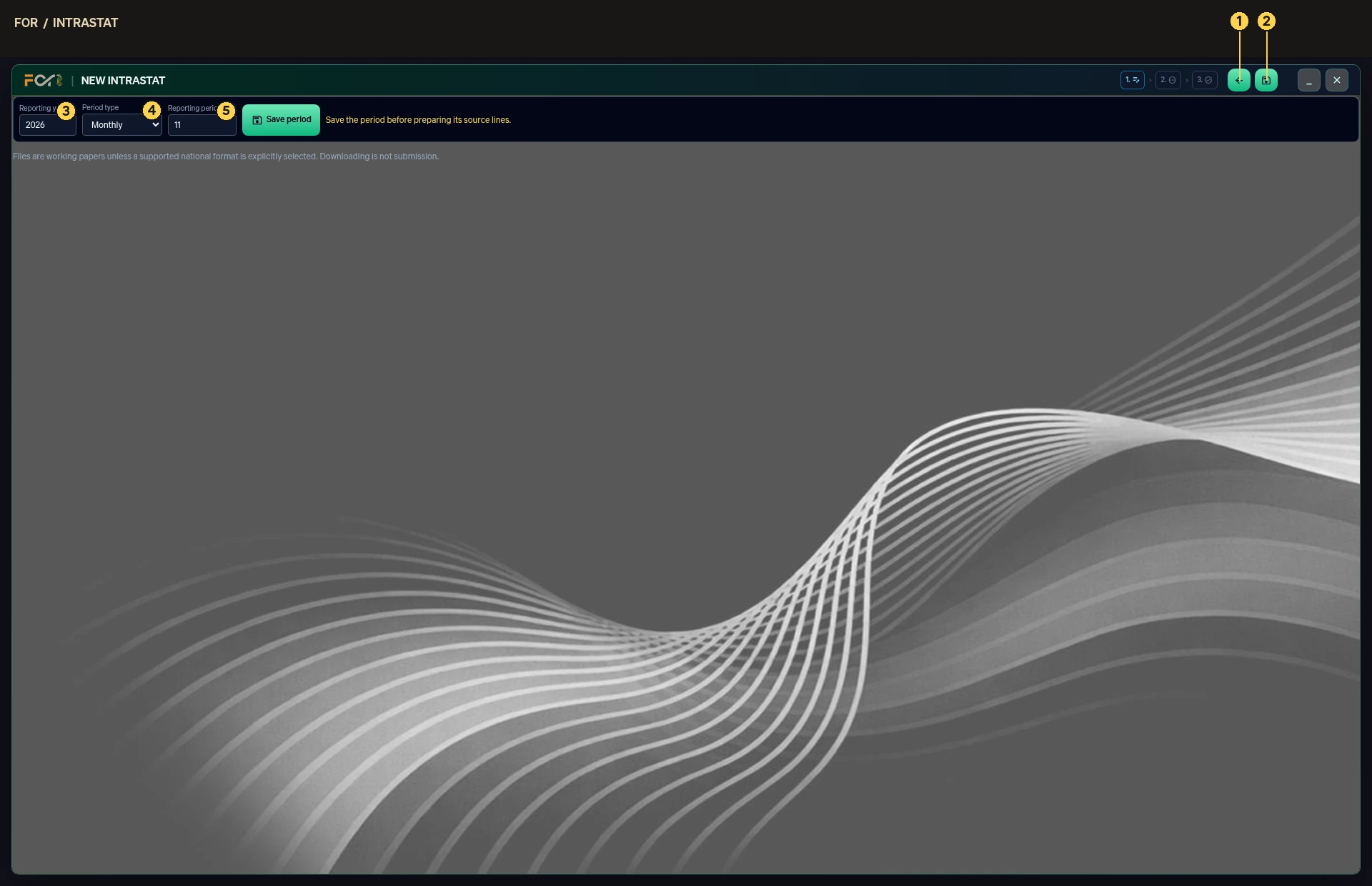
- 1
Back to list
Return to saved periods after resolving unsaved header or line-classification changes.
- 2
Save / Save period
Save the reviewed period and editable header choices. This is not submission of a national filing, and it is not the separate VAT posting confirmation.
- 3
Reporting year
Select the actual filing/review year. Once a period is saved, its identity is fixed; a different year needs a separate period rather than relabeling the old evidence.
- 4
Period type
Choose Monthly or Quarterly. Annual appears only for supported national VAT outputs; it is not offered universally.
- 5
Reporting period
Enter the month from 1 to 12 or quarter from 1 to 4 according to Period type. Annual outputs do not need a month/quarter number.
How to work here
Prepare the eligible trade period, classify each source line and export the supported output only after review.
- Choose the period and trade section, save/prepare the review where permitted and wait for every page of source work to finish.
- Review product classification, commodity/service code, partner country/tax identity, transaction nature, quantity and value. Open the source when permissions allow.
- Save the allowed line classification, resolve unresolved items and use Review export or the Italian INTR file when offered.
Every field and control
Use the exact label or hover over an icon to match it to this reference. A missing action is not the same as an empty field: check its availability below.
Choose the actual review period. A registration/payment date basis can differ from document date; use the screen's stated basis.
Availability: Shown when the corresponding workflow and your permissions allow it; review required markers and any disabled-state explanation.
Narrow the current review without changing source documents or classifying unseen rows.
Availability: Shown when the corresponding workflow and your permissions allow it; review required markers and any disabled-state explanation.
Prepare the period's review with its recorded progress. A partial preparation must finish before a complete export can be claimed.
Availability: Only when offered by the current screen, role and saved workflow state. Read any confirmation before proceeding.
Refresh
ActionRead current review state; resolve unsaved classifications before changing pages or refreshing.
Availability: Only when offered by the current screen, role and saved workflow state. Read any confirmation before proceeding.
Open source document
ActionOpen the actual source when your role permits; read-only review does not grant ordinary accounting edits.
Availability: Only when offered by the current screen, role and saved workflow state. Read any confirmation before proceeding.
Review export
ActionDownload the supported reviewed result, retaining the chosen company and period. This is not automatic submission to a tax authority.
Availability: Only when offered by the current screen, role and saved workflow state. Read any confirmation before proceeding.
Previous / Next
ActionReview all pages; pending row edits can block navigation so they are not lost.
Availability: Only when offered by the current screen, role and saved workflow state. Read any confirmation before proceeding.
Reporting year
FieldSelect the actual filing/review year. Once a period is saved, its identity is fixed; a different year needs a separate period rather than relabeling the old evidence.
Availability: Shown when the corresponding workflow and your permissions allow it; review required markers and any disabled-state explanation.
Back to list
ActionReturn to saved periods after resolving unsaved header or line-classification changes.
Availability: Only when offered by the current screen, role and saved workflow state. Read any confirmation before proceeding.
Save / Save period
ActionSave the reviewed period and editable header choices. This is not submission of a national filing, and it is not the separate VAT posting confirmation.
Availability: Only when offered by the current screen, role and saved workflow state. Read any confirmation before proceeding.
Period type
FieldChoose Monthly or Quarterly. Annual appears only for supported national VAT outputs; it is not offered universally.
Availability: Shown when the corresponding workflow and your permissions allow it; review required markers and any disabled-state explanation.
Reporting period
FieldEnter the month from 1 to 12 or quarter from 1 to 4 according to Period type. Annual outputs do not need a month/quarter number.
Availability: Shown when the corresponding workflow and your permissions allow it; review required markers and any disabled-state explanation.
Source
FieldRead source number, date, party and the additional payment/registration date shown. The date basis differs between a trade declaration and a withholding working paper.
Availability: Shown when the corresponding workflow and your permissions allow it; review required markers and any disabled-state explanation.
Product / description
FieldReview the source item and retained line wording before choosing a classification. A similar description is not proof of the same statutory treatment.
Availability: Shown when the corresponding workflow and your permissions allow it; review required markers and any disabled-state explanation.
Recorded amount
FieldThe preserved source amount in the company's displayed home currency. This working-paper classification does not rewrite the underlying document.
Availability: Shown when the corresponding workflow and your permissions allow it; review required markers and any disabled-state explanation.
Provenance
FieldRead where the classification/evidence came from and whether it is retained legacy history. Do not treat an unreviewed suggestion as an approved filing.
Availability: Shown when the corresponding workflow and your permissions allow it; review required markers and any disabled-state explanation.
Select for export
FieldInclude an eligible reviewed row in the working-paper export. Selection alone is not transmission, and incomplete preparation keeps line editing locked.
Availability: Shown when the corresponding workflow and your permissions allow it; review required markers and any disabled-state explanation.
Confirm only after comparing the changed source and the retained classification. Do not check it just to remove a warning.
Availability: Shown when the corresponding workflow and your permissions allow it; review required markers and any disabled-state explanation.
Prepare new revision
ActionKeep previous evidence and create a separately reviewed revision when sources changed or a legacy filing needs the current source-line workflow.
Availability: Only when offered by the current screen, role and saved workflow state. Read any confirmation before proceeding.
Collect the chosen period's source evidence and continue the same incomplete preparation. Provisional rows cannot be classified as though collection were complete.
Availability: Only when offered by the current screen, role and saved workflow state. Read any confirmation before proceeding.
Stop after current page
ActionStop the preparation loop after its current bounded step. It does not undo previously collected evidence or delete the period.
Availability: Only when offered by the current screen, role and saved workflow state. Read any confirmation before proceeding.
Save classification
ActionSave the explicit review for this row only after preparation is complete. Other rows and the original accounting amounts remain separate.
Availability: Only when offered by the current screen, role and saved workflow state. Read any confirmation before proceeding.
Intrastat Code
FieldType at least three characters to search the offered catalogue, review its full description and choose the correct code. Arrow keys move, Enter selects and Escape closes the choices.
Availability: Shown when the corresponding workflow and your permissions allow it; review required markers and any disabled-state explanation.
Credit-note corrections can require Original month, quarter, year, customs section, filing year/protocol and original service row. Supply the actual prior filing references, not the credit-note date as a substitute.
Availability: Shown when the corresponding workflow and your permissions allow it; review required markers and any disabled-state explanation.
Italian INTR file
ActionGenerate the explicitly offered Italian format only after complete preparation and row review. Downloading the file is not submission to the authority.
Availability: Only when offered by the current screen, role and saved workflow state. Read any confirmation before proceeding.