
Billable time entries
Review eligible approved time and issue a native invoice without creating a dummy billing plan. Payroll costs are not customer selling prices.
Open this screen
Command launcher → Finance → Billable time entry. Choose New, Edit/Search or List only as offered.
When it is available
Available to users whose company roles permit this work. Country, subscription, company settings and the saved record's state can narrow the available controls.
QuickBooks connection
This screen prepares or displays work in FOR; opening it does not write to QuickBooks. Where a later step creates an accounting document, that step is identified separately. FOR:CEO never sends its accounting entries to QuickBooks.
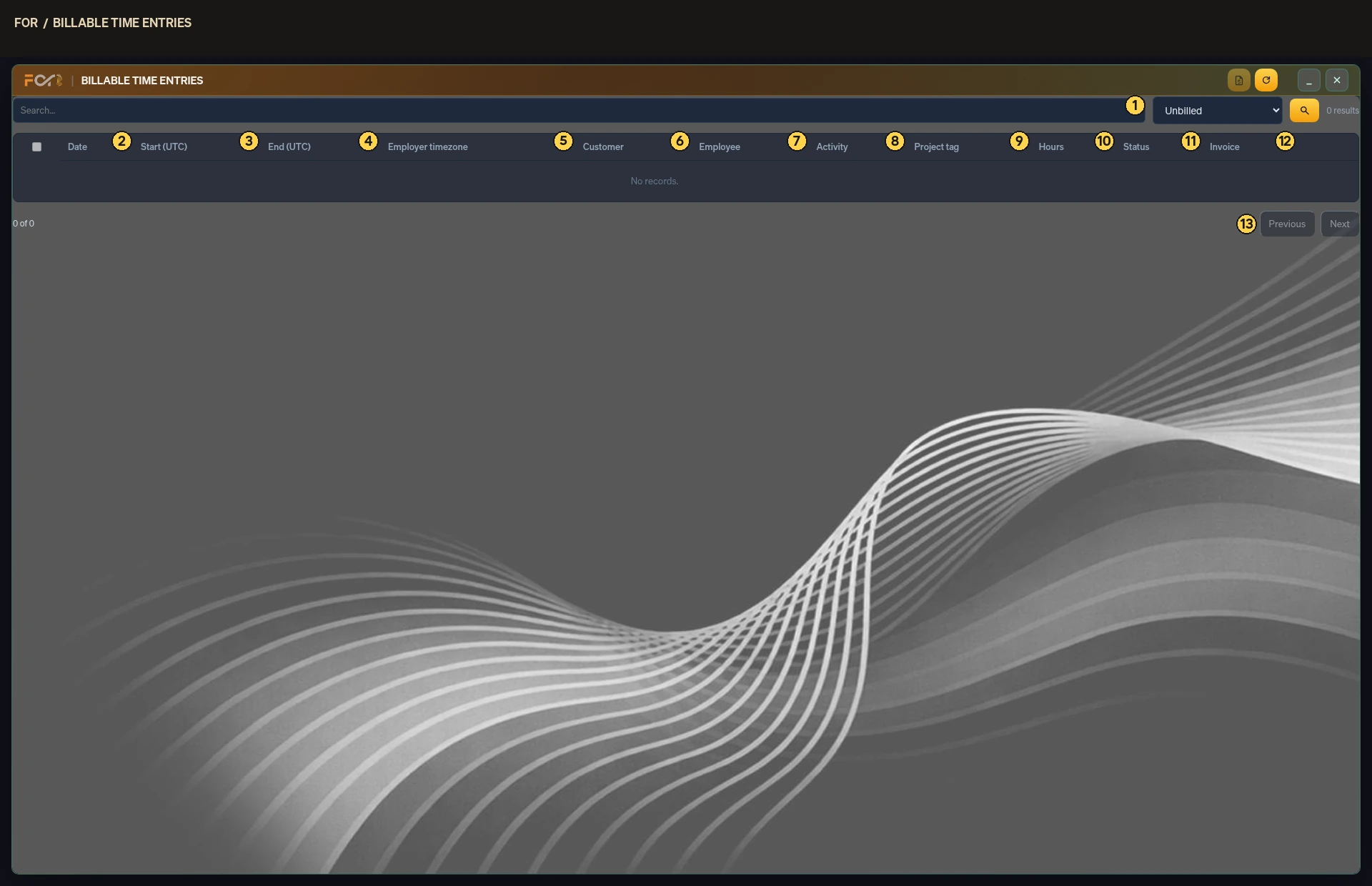
- 1
Search · magnifying glass
Search this company's selected list by the visible document number, business name or descriptive words. Confirm the active company first. Search results do not widen your role permissions; clear the search to return to the ordinary filtered list.
- 2
Date
Use the business date described by the caption. Document, registration, planned and actual dates have different meanings; the wrong date can put work in a different reporting or fulfillment period. New transaction dates may start at your local today; always verify imported or copied dates.
- 3
Start (UTC)
Read this saved-record summary before opening the row. Use the full form for the field's context and related documents; a list summary is not an editable posting field.
- 4
End (UTC)
Read this saved-record summary before opening the row. Use the full form for the field's context and related documents; a list summary is not an editable posting field.
- 5
Employer timezone
Read this saved-record summary before opening the row. Use the full form for the field's context and related documents; a list summary is not an editable posting field.
- 6
Customer
Read the named party, activity or document inherited from this record's source. Use the related record link to inspect it. A displayed name is not permission to substitute a different customer, employee or source document.
- 7
Employee
Read the named party, activity or document inherited from this record's source. Use the related record link to inspect it. A displayed name is not permission to substitute a different customer, employee or source document.
- 8
Activity
Read the named party, activity or document inherited from this record's source. Use the related record link to inspect it. A displayed name is not permission to substitute a different customer, employee or source document.
- 9
Project tag
Read the named party, activity or document inherited from this record's source. Use the related record link to inspect it. A displayed name is not permission to substitute a different customer, employee or source document.
- 10
Hours
Use the unit explicitly shown and distinguish work from breaks. Review the date and duration rather than mixing decimal hours with hours/minutes. Native clock/approval rules and legacy financial Time Activity are separate workflows.
- 11
Status
Read the saved lifecycle or review result. Downstream receipts, shipments, payments or approved work may determine it automatically. A status is not proof of a different process: shipped does not mean invoiced, and a prepared preview does not mean posted.
- 12
Invoice
Read the named party, activity or document inherited from this record's source. Use the related record link to inspect it. A displayed name is not permission to substitute a different customer, employee or source document.
- 13
Previous / Next / page size
Move through the current filtered result set. The count refers to those filters, not the whole company. Changing filters starts a new result set; a short page does not by itself prove that unrelated records do not exist.
Complete the task
Review eligible approved time and issue a native invoice without creating a dummy billing plan. Payroll costs are not customer selling prices.
- Open the Finance list or Bill time entries from a customer. Select eligible unbilled time and review the activity/service, project and quantities.
- Preview the invoice using the actual sales price rules and tax treatment. Different projects remain separate even when project names are hidden on the invoice.
- Confirm only the reviewed quote, then open the invoice. Time already claimed by a scheduled plan, previously billed history or unresolved billing is not new invoiceable work.
Saved, read-only and unavailable states
The saved record and its source workflow determine which fields can change. Read-only values stay visible for review; they are not broken inputs. Save/discard unsaved edits before an action that requires a clean source. If the result of an operation is uncertain, inspect and reconcile that same operation rather than repeating a new write.
Every field and control
Use the exact label or hover over an icon to match it to this reference. A missing action is not the same as an empty field: check its availability below.
Search · magnifying glass
ActionSearch this company's selected list by the visible document number, business name or descriptive words. Confirm the active company first. Search results do not widen your role permissions; clear the search to return to the ordinary filtered list.
Availability: List and lookup views. A source-specific picker can intentionally offer fewer records than the full list.
Include retained inactive/completed records when the list offers this control. Open order views exclude Draft, Closed and Cancelled; completed pick/pack tasks are normally found through Show inactive. Historical visibility does not reactivate or reopen a record.
Availability: Only when the list supports inactive or lifecycle filtering; choices depend on the document type.
Previous / Next / page size
ActionMove through the current filtered result set. The count refers to those filters, not the whole company. Changing filters starts a new result set; a short page does not by itself prove that unrelated records do not exist.
Availability: Paged lists; Previous/Next is disabled when no page exists in that direction.
Open a row
ActionSelect the record's main name/number to open its form. Email and phone links have their own communication actions. A linked count or financial balance can open the corresponding transaction rail rather than edit that total.
Availability: Requires permission to open the record. Reference-only roles receive only the permitted context.
Back to list · left arrow
ActionReturn to the current document list. If the form has unsaved changes, decide explicitly whether to keep working or discard them. Going back is not Save and does not reverse a completed operation.
Availability: Ordinary forms; a guided batch or specialized workflow can manage navigation itself.
Minimize · minus
ActionKeep this workspace open as a colored taskbar tile. Select that tile to restore the same window. Minimizing is not Save and does not cancel an operation already submitted.
Availability: Hosted workspace windows.
Close window · X
ActionClose this window, not the underlying record. Respect any unsaved-change or unfinished-operation warning. Closing a window never reverses a posted document, dispatched shipment or sent email.
Availability: Hosted workspace windows; an active workflow can require waiting or confirming navigation.
Date
ColumnUse the business date described by the caption. Document, registration, planned and actual dates have different meanings; the wrong date can put work in a different reporting or fulfillment period. New transaction dates may start at your local today; always verify imported or copied dates.
Availability: Read-only display; inspect the originating workflow to change its result.
Start (UTC)
ColumnRead this saved-record summary before opening the row. Use the full form for the field's context and related documents; a list summary is not an editable posting field.
Availability: Read-only display; inspect the originating workflow to change its result.
End (UTC)
ColumnRead this saved-record summary before opening the row. Use the full form for the field's context and related documents; a list summary is not an editable posting field.
Availability: Read-only display; inspect the originating workflow to change its result.
Employer timezone
ColumnRead this saved-record summary before opening the row. Use the full form for the field's context and related documents; a list summary is not an editable posting field.
Availability: Read-only display; inspect the originating workflow to change its result.
Customer
ColumnRead the named party, activity or document inherited from this record's source. Use the related record link to inspect it. A displayed name is not permission to substitute a different customer, employee or source document.
Availability: Read-only display; inspect the originating workflow to change its result.
Employee
ColumnRead the named party, activity or document inherited from this record's source. Use the related record link to inspect it. A displayed name is not permission to substitute a different customer, employee or source document.
Availability: Read-only display; inspect the originating workflow to change its result.
Activity
ColumnRead the named party, activity or document inherited from this record's source. Use the related record link to inspect it. A displayed name is not permission to substitute a different customer, employee or source document.
Availability: Read-only display; inspect the originating workflow to change its result.
Project tag
ColumnRead the named party, activity or document inherited from this record's source. Use the related record link to inspect it. A displayed name is not permission to substitute a different customer, employee or source document.
Availability: Read-only display; inspect the originating workflow to change its result.
Hours
ColumnUse the unit explicitly shown and distinguish work from breaks. Review the date and duration rather than mixing decimal hours with hours/minutes. Native clock/approval rules and legacy financial Time Activity are separate workflows.
Availability: Read-only display; inspect the originating workflow to change its result.
Status
ColumnRead the saved lifecycle or review result. Downstream receipts, shipments, payments or approved work may determine it automatically. A status is not proof of a different process: shipped does not mean invoiced, and a prepared preview does not mean posted.
Availability: Read-only display; inspect the originating workflow to change its result.
Invoice
ColumnRead the named party, activity or document inherited from this record's source. Use the related record link to inspect it. A displayed name is not permission to substitute a different customer, employee or source document.
Availability: Read-only display; inspect the originating workflow to change its result.
Employee
FieldRead the named party, activity or document inherited from this record's source. Use the related record link to inspect it. A displayed name is not permission to substitute a different customer, employee or source document.
Availability: Editable only when your role, document state and the source workflow allow it; not every country or document variant shows this field.
Date
FieldUse the business date described by the caption. Document, registration, planned and actual dates have different meanings; the wrong date can put work in a different reporting or fulfillment period. New transaction dates may start at your local today; always verify imported or copied dates.
Availability: Editable only when your role, document state and the source workflow allow it; not every country or document variant shows this field.
Hours
FieldUse the unit explicitly shown and distinguish work from breaks. Review the date and duration rather than mixing decimal hours with hours/minutes. Native clock/approval rules and legacy financial Time Activity are separate workflows.
Availability: Editable only when your role, document state and the source workflow allow it; not every country or document variant shows this field.
Customer
FieldRead the named party, activity or document inherited from this record's source. Use the related record link to inspect it. A displayed name is not permission to substitute a different customer, employee or source document.
Availability: Editable only when your role, document state and the source workflow allow it; not every country or document variant shows this field.
Activity
FieldRead the named party, activity or document inherited from this record's source. Use the related record link to inspect it. A displayed name is not permission to substitute a different customer, employee or source document.
Availability: Editable only when your role, document state and the source workflow allow it; not every country or document variant shows this field.
Project tag
FieldRead the named party, activity or document inherited from this record's source. Use the related record link to inspect it. A displayed name is not permission to substitute a different customer, employee or source document.
Availability: Editable only when your role, document state and the source workflow allow it; not every country or document variant shows this field.
Billing product
FieldDefine how eligible worked time maps to a commercial service quantity. Approval, source eligibility and billing ownership still apply. The service's selling price is separate from employee hourly cost, and already-billed/imported evidence is not automatically new billable work.
Availability: Editable only when your role, document state and the source workflow allow it; not every country or document variant shows this field.
Quantity
FieldEnter the intended quantity in the unit shown beside it. Check the source/order or recipe basis before changing it; ordered, physical and recipe quantities can use different units. Quantities already consumed by later workflow steps are protected.
Availability: Editable only when your role, document state and the source workflow allow it; not every country or document variant shows this field.
Define how eligible worked time maps to a commercial service quantity. Approval, source eligibility and billing ownership still apply. The service's selling price is separate from employee hourly cost, and already-billed/imported evidence is not automatically new billable work.
Availability: Editable only when your role, document state and the source workflow allow it; not every country or document variant shows this field.
Status
FieldRead the saved lifecycle or review result. Downstream receipts, shipments, payments or approved work may determine it automatically. A status is not proof of a different process: shipped does not mean invoiced, and a prepared preview does not mean posted.
Availability: Editable only when your role, document state and the source workflow allow it; not every country or document variant shows this field.
Invoice
FieldRead the named party, activity or document inherited from this record's source. Use the related record link to inspect it. A displayed name is not permission to substitute a different customer, employee or source document.
Availability: Editable only when your role, document state and the source workflow allow it; not every country or document variant shows this field.
Identify the original business document or line that owns this activity. Use its open link to verify the source. A saved source reference must not be replaced with an unrelated document to bypass remaining quantities, billing ownership or traceability.
Availability: Editable only when your role, document state and the source workflow allow it; not every country or document variant shows this field.
Historical time
FieldRead the saved lifecycle or review result. Downstream receipts, shipments, payments or approved work may determine it automatically. A status is not proof of a different process: shipped does not mean invoiced, and a prepared preview does not mean posted.
Availability: Editable only when your role, document state and the source workflow allow it; not every country or document variant shows this field.
Description
FieldDescribe the product, service or work in enough detail for the next operator. Sales copy is intended for commercial documents; internal/purchasing copy describes the operational need. Expand the text editor to read long text without changing the row's meaning.
Availability: Editable only when your role, document state and the source workflow allow it; not every country or document variant shows this field.
Billing review
FieldRead the saved lifecycle or review result. Downstream receipts, shipments, payments or approved work may determine it automatically. A status is not proof of a different process: shipped does not mean invoiced, and a prepared preview does not mean posted.
Availability: Editable only when your role, document state and the source workflow allow it; not every country or document variant shows this field.
Watch the workflow

This recording is temporarily unavailable. Please try again later.
FOR:CEO only — native Time workflow, shown as part of the FOR product portfolio.
Link billable time to a service
Read the steps
- Link the activity to a sales service and define minutes per unit. Internal time cost and the customer's sales price are distinct.