
Connect and manage bank accounts
Bring supported bank movements into FOR for review. Connecting or reading an account is different from posting its transactions or initiating payments.
Open this screen
Sidebar → FOR:EXCHANGE → open the bank workspace.
When it is available
Available to users whose company roles permit this work. Country, subscription, company settings and the saved record's state can narrow the available controls.
QuickBooks connection
This screen prepares or displays work in FOR; opening it does not write to QuickBooks. Where a later step creates an accounting document, that step is identified separately. FOR:CEO never sends its accounting entries to QuickBooks.
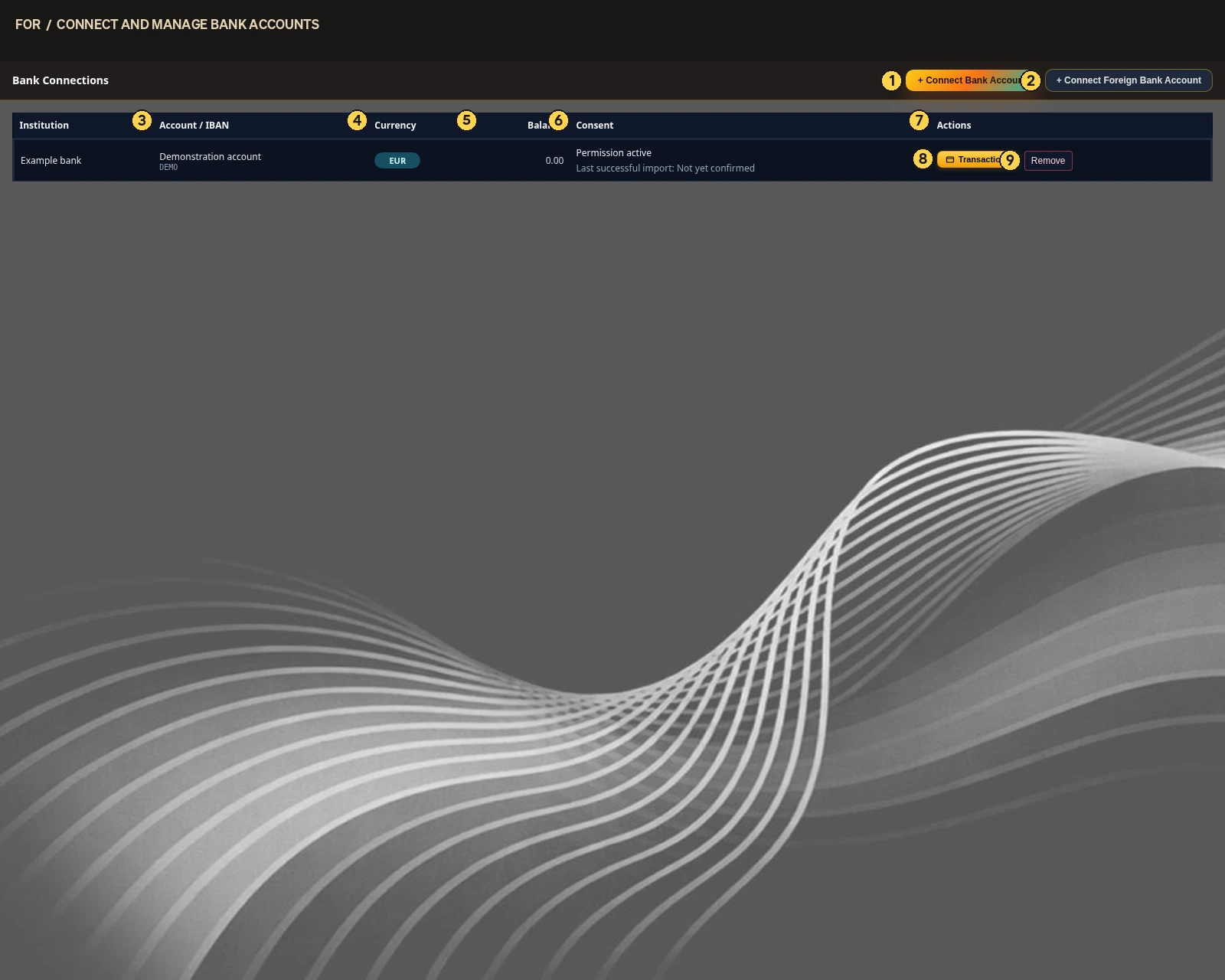
- 1
Connect Bank Account
Start the permitted bank-consent journey; review which accounts and access you authorize.
- 2
Connect Foreign Bank Account
Use the offered other-region connection route without changing the company's legal country. Coverage still depends on the available institutions and consent flow.
- 3
Institution
Read the connected bank and account nature before selecting it. One institution can have several separately authorized accounts.
- 4
Account / masked IBAN / currency
Identify the actual bank account before mapping or processing. Similar names are not proof of the same account.
- 5
Currency
The currency of this bank account. Its accounting mapping must be compatible; do not choose a similarly named account in another currency.
- 6
Balance / balance as of
Read the source age alongside the amount. A recent transaction import does not prove the balance was refreshed at the same moment.
- 7
Consent
Read active, expiring or expired access and the offered renewal action. Expired access can leave historical transactions visible while fresh bank reads are unavailable.
- 8
Transactions / Open account
Open this account's movements, keeping its currency and identity. Reading them does not create financial entries.
- 9
Remove account / disconnect
Review the specific account/connection being removed. Disconnecting a feed does not delete or reverse already-recorded accounting.
How to work here
Bring supported bank movements into FOR for review. Connecting or reading an account is different from posting its transactions or initiating payments.
- Choose Connect Bank Account, complete the bank's consent flow and return to FOR. Verify the returned institution, masked account identity and currency.
- Link the downloaded account to the actual eligible company bank account. Reading a bank balance does not choose an accounting account for you.
- Review consent status, expiry and reconnect notices; use Reauthorize when requested. Last transaction import and balance freshness are different timestamps.
- If Auto-post is offered in your account view, leave it off until you have reviewed its behavior, accounts and instructions. The reviewed matching workspace instead keeps creation/association behind its explicit confirmation.
Every field and control
Use the exact label or hover over an icon to match it to this reference. A missing action is not the same as an empty field: check its availability below.
Connect Bank Account
ActionStart the permitted bank-consent journey; review which accounts and access you authorize.
Availability: Only when offered by the current screen, role and saved workflow state. Read any confirmation before proceeding.
Identify the actual bank account before mapping or processing. Similar names are not proof of the same account.
Availability: Shown when the corresponding workflow and your permissions allow it; review required markers and any disabled-state explanation.
Balance / balance as of
FieldRead the source age alongside the amount. A recent transaction import does not prove the balance was refreshed at the same moment.
Availability: Shown when the corresponding workflow and your permissions allow it; review required markers and any disabled-state explanation.
Accounting account
FieldMap to the eligible company bank account and matching currency; do not use a revenue account as the bank.
Availability: Shown when the corresponding workflow and your permissions allow it; review required markers and any disabled-state explanation.
Control automation per account, not as a blanket consent for all bank accounts. Review instructions and entitlements before enabling.
Availability: Shown when the corresponding workflow and your permissions allow it; review required markers and any disabled-state explanation.
Remove account / disconnect
ActionReview the specific account/connection being removed. Disconnecting a feed does not delete or reverse already-recorded accounting.
Availability: Only when offered by the current screen, role and saved workflow state. Read any confirmation before proceeding.
Institution
FieldRead the connected bank and account nature before selecting it. One institution can have several separately authorized accounts.
Availability: Shown when the corresponding workflow and your permissions allow it; review required markers and any disabled-state explanation.
Currency
FieldThe currency of this bank account. Its accounting mapping must be compatible; do not choose a similarly named account in another currency.
Availability: Shown when the corresponding workflow and your permissions allow it; review required markers and any disabled-state explanation.
Consent
FieldRead active, expiring or expired access and the offered renewal action. Expired access can leave historical transactions visible while fresh bank reads are unavailable.
Availability: Shown when the corresponding workflow and your permissions allow it; review required markers and any disabled-state explanation.
Connect Foreign Bank Account
ActionUse the offered other-region connection route without changing the company's legal country. Coverage still depends on the available institutions and consent flow.
Availability: Only when offered by the current screen, role and saved workflow state. Read any confirmation before proceeding.
Transactions / Open account
ActionOpen this account's movements, keeping its currency and identity. Reading them does not create financial entries.
Availability: Only when offered by the current screen, role and saved workflow state. Read any confirmation before proceeding.
Continue the bank-required secure step in its own window, then return to FOR and verify the resulting account/consent status.
Availability: Only when offered by the current screen, role and saved workflow state. Read any confirmation before proceeding.
Reload accounts
ActionRead the connection result after returning from the bank; do not assume that merely opening the bank page completed consent.
Availability: Only when offered by the current screen, role and saved workflow state. Read any confirmation before proceeding.
Close / Back to accounts
ActionLeave the consent view and inspect current accounts. Closing the view does not prove approval or undo a consent already granted at the bank.
Availability: Only when offered by the current screen, role and saved workflow state. Read any confirmation before proceeding.