
Compliance settings
Country determines which tax panels are offered. Complete the real company identity and review each enabled filing/notification behavior.
Open this screen
Sidebar → Settings → Compliance.
When it is available
Available to users whose company roles permit this work. Country, subscription, company settings and the saved record's state can narrow the available controls.
QuickBooks connection
This screen prepares or displays work in FOR; opening it does not write to QuickBooks. Where a later step creates an accounting document, that step is identified separately. FOR:CEO never sends its accounting entries to QuickBooks.
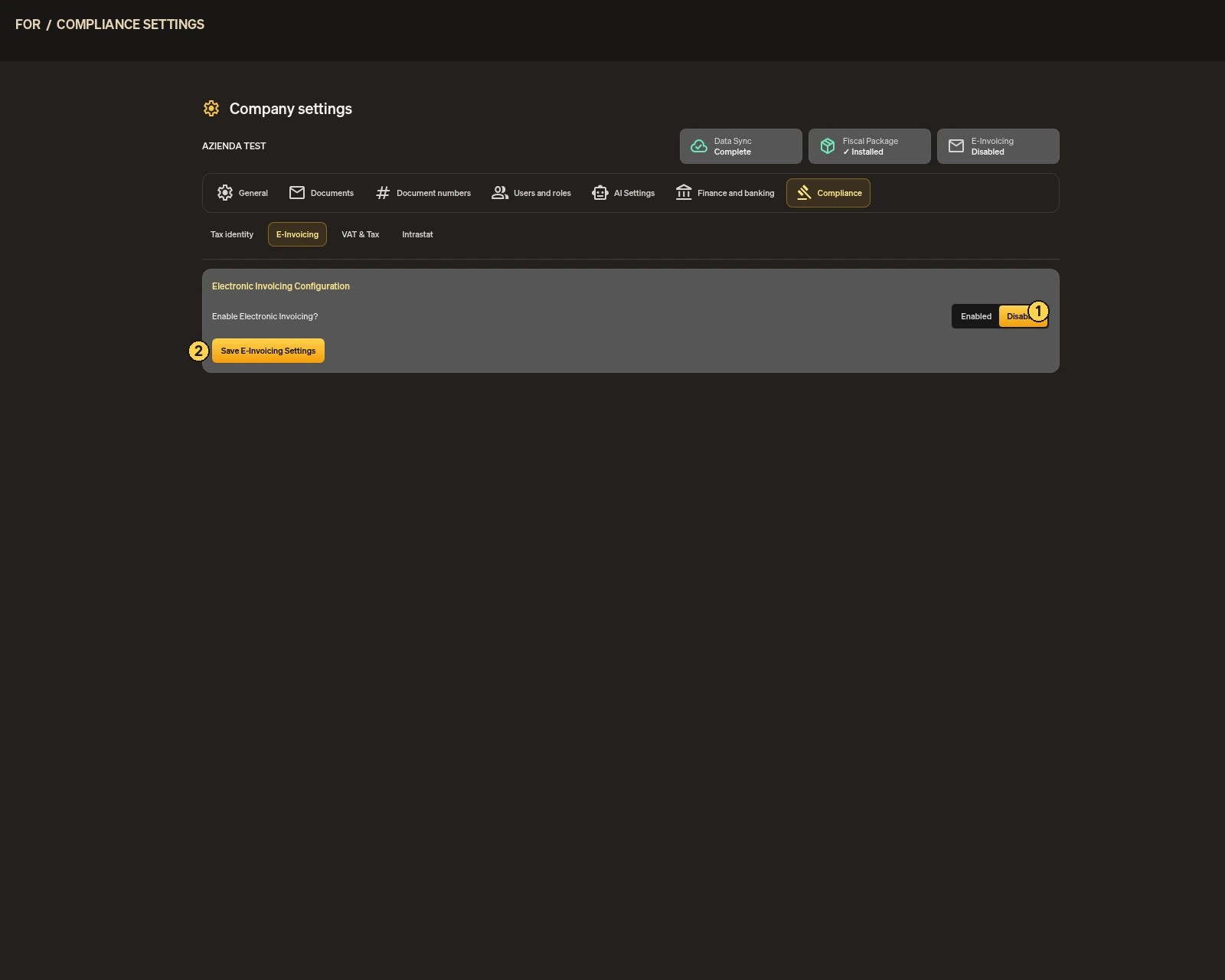
- 1
Enable Electronic Invoicing?
Review country availability and completed fiscal-package prerequisites before enabling the service.
- 2
Save E-Invoicing Settings
Confirm only the intended enabled receiving and notification behavior.
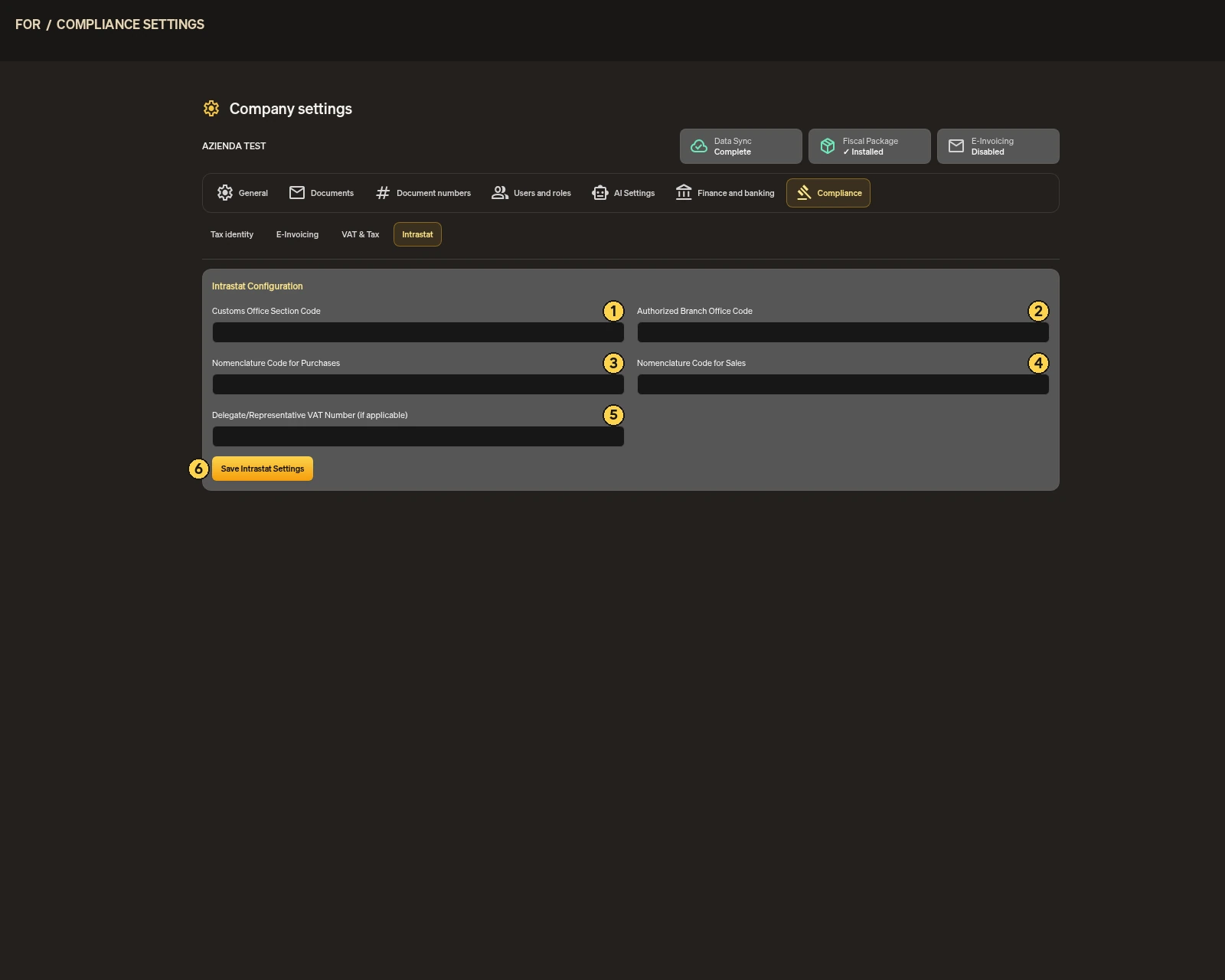
- 1
Customs Office Section Code
Use the official section code required by the company's Intrastat filing context.
- 2
Authorized Branch Office Code
Use the applicable authorized branch identifier, not an arbitrary warehouse code.
- 3
Nomenclature Code for Purchases
Review the supported purchase-side classification default; individual source-line review remains necessary.
- 4
Nomenclature Code for Sales
Review the supported sales-side classification default without substituting it for legally different products.
- 5
Delegate / Representative VAT Number
Provide the actual authorized representative's VAT identity only when applicable.
- 6
Save Intrastat Settings
Save the reviewed identifiers/defaults; it does not generate or submit a filing.
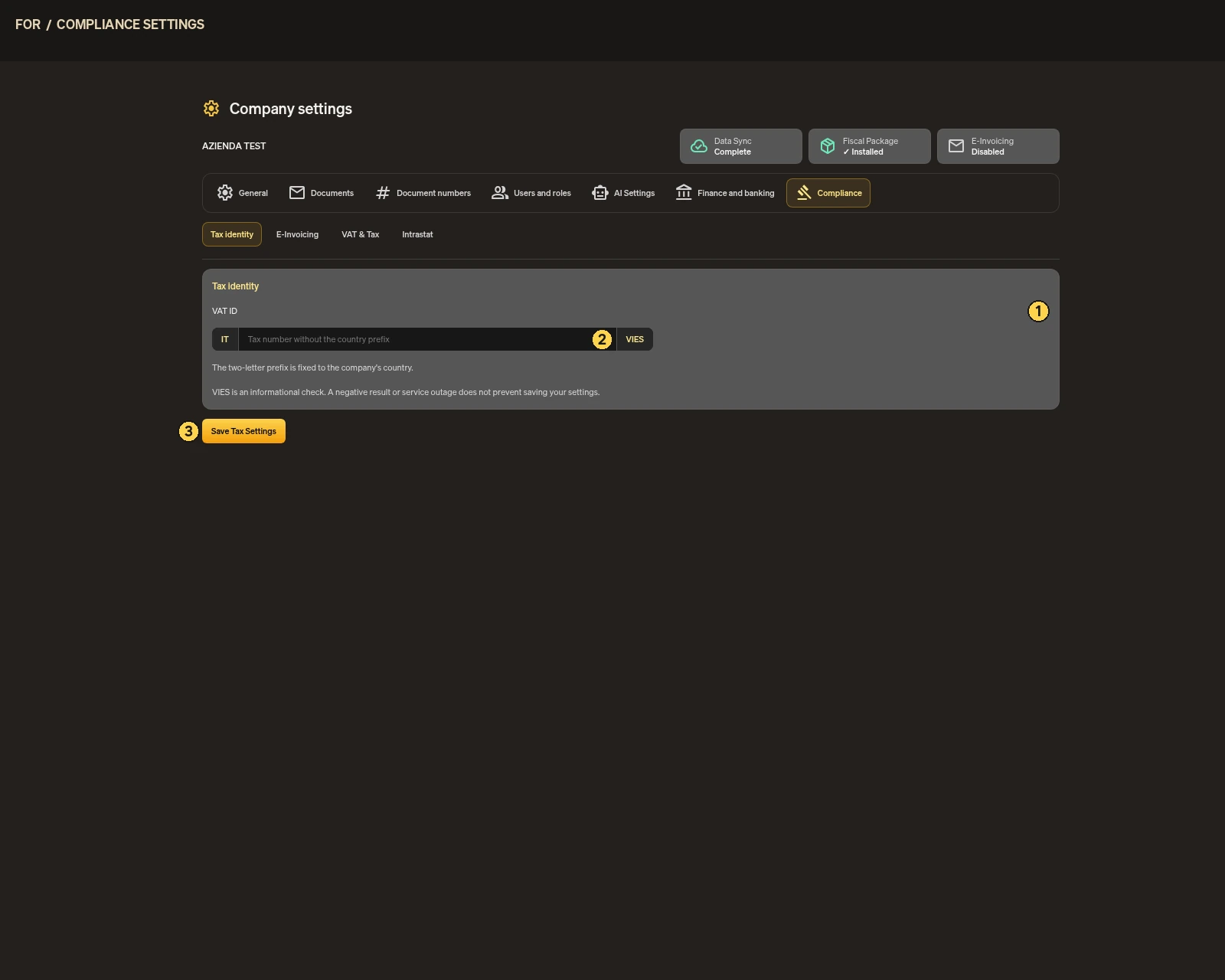
- 1
VAT ID / Tax ID / country prefix
Enter the number without repeating the fixed country prefix. The prefix follows the company country, not the interface language.
- 2
VIES
Run the informational VAT check. A negative result or service outage does not prevent saving settings and does not justify inventing a number.
- 3
Save Tax Settings
Save the reviewed tax-identity/VAT preferences for the current company.
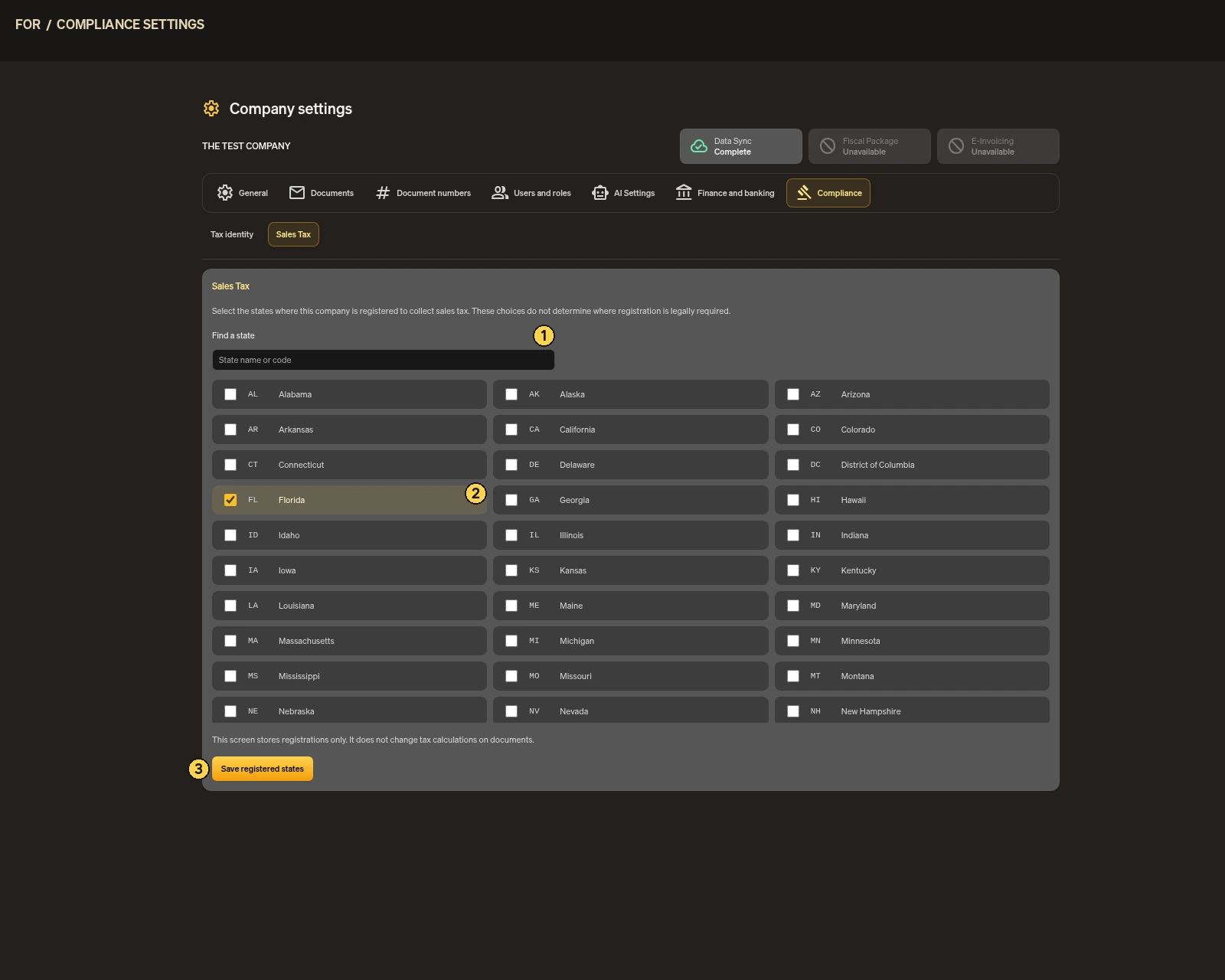
- 1
Find a state
Filter the US registration choices by state name or two-letter code. Searching does not register the company or select a state.
- 2
Registered states · checkboxes
Select only jurisdictions where this company is actually registered to collect sales tax. The highlighted checkbox is the saved/prepared selection, not legal advice on where registration is required. Review the whole list before Save registered states.
- 3
Save registered states
Store actual US registrations; this screen does not retroactively recalculate existing documents.
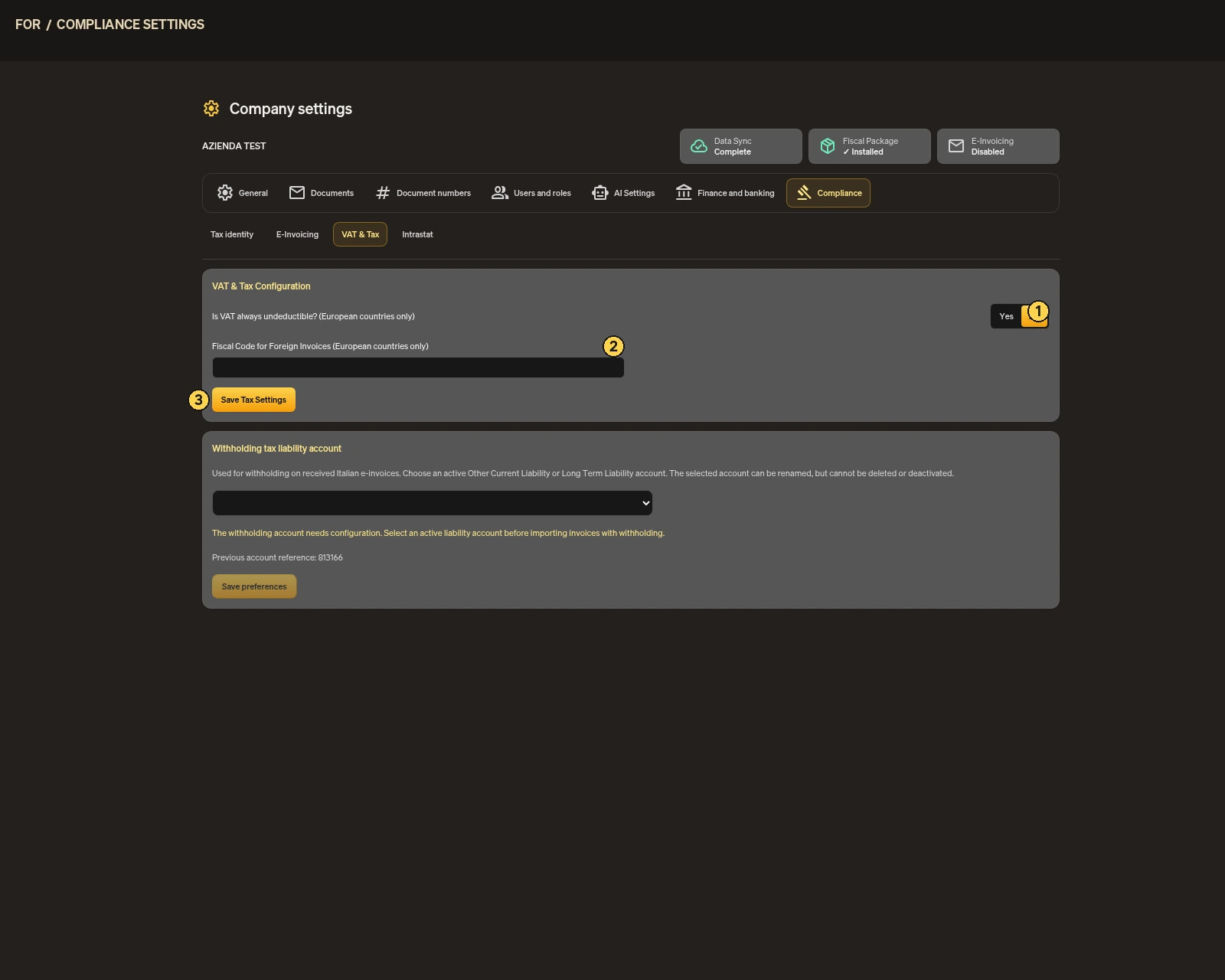
- 1
Is VAT always undeductible?
Use only for the company's actual reviewed policy. This can affect VAT-return interpretation and is not a harmless default for another country's partial recovery.
- 2
Fiscal Code for Foreign Invoices
Enter the actual required company fiscal reference for the supported foreign-document process.
- 3
Save Tax Settings
Save the reviewed tax-identity/VAT preferences for the current company.
How to work here
Country determines which tax panels are offered. Complete the real company identity and review each enabled filing/notification behavior.
- Tax identity: verify tax number and company jurisdiction. A language switch does not change tax jurisdiction.
- E-Invoicing: review availability, fiscal-package prerequisites, receiving and notification choices; do not enable automatic customer communication unintentionally.
- VAT/Intrastat: review non-deductibility, foreign-invoice fiscal code, withholding account, customs/branch and nomenclature/delegate fields where offered.
- US Sales Tax: select registered states and review product facts and exemption certificates; no registration should be inferred merely from a shipping address.
Every field and control
Use the exact label or hover over an icon to match it to this reference. A missing action is not the same as an empty field: check its availability below.
Enter the number without repeating the fixed country prefix. The prefix follows the company country, not the interface language.
Availability: Shown when the corresponding workflow and your permissions allow it; review required markers and any disabled-state explanation.
Review country availability and completed fiscal-package prerequisites before enabling the service.
Availability: Shown when the corresponding workflow and your permissions allow it; review required markers and any disabled-state explanation.
Use only the offered eligible European-country receiving option; it is not worldwide document coverage.
Availability: Shown when the corresponding workflow and your permissions allow it; review required markers and any disabled-state explanation.
For Italian companies, deliberately include zero-total supplier invoices/credits and their zero lines. Valid accounts and tax codes remain required.
Availability: Shown when the corresponding workflow and your permissions allow it; review required markers and any disabled-state explanation.
Enable real buyer notifications after the supported accepted-document stage; verify recipient addresses and link behavior first.
Availability: Shown when the corresponding workflow and your permissions allow it; review required markers and any disabled-state explanation.
Send availability notices to configured company intake addresses, not automatically to every supplier.
Availability: Shown when the corresponding workflow and your permissions allow it; review required markers and any disabled-state explanation.
Review the configured threshold in the supported country workflow with your accountant. It does not replace the underlying tax-code classification.
Availability: Shown when the corresponding workflow and your permissions allow it; review required markers and any disabled-state explanation.
Use only for the company's actual reviewed policy. This can affect VAT-return interpretation and is not a harmless default for another country's partial recovery.
Availability: Shown when the corresponding workflow and your permissions allow it; review required markers and any disabled-state explanation.
Enter the actual required company fiscal reference for the supported foreign-document process.
Availability: Shown when the corresponding workflow and your permissions allow it; review required markers and any disabled-state explanation.
Withholding account
FieldChoose the eligible liability account for Italian withholding treatment, separately from ordinary supplier cost accounts.
Availability: Shown when the corresponding workflow and your permissions allow it; review required markers and any disabled-state explanation.
Use the official section code required by the company's Intrastat filing context.
Availability: Shown when the corresponding workflow and your permissions allow it; review required markers and any disabled-state explanation.
Use the applicable authorized branch identifier, not an arbitrary warehouse code.
Availability: Shown when the corresponding workflow and your permissions allow it; review required markers and any disabled-state explanation.
Review the supported purchase-side classification default; individual source-line review remains necessary.
Availability: Shown when the corresponding workflow and your permissions allow it; review required markers and any disabled-state explanation.
Review the supported sales-side classification default without substituting it for legally different products.
Availability: Shown when the corresponding workflow and your permissions allow it; review required markers and any disabled-state explanation.
Provide the actual authorized representative's VAT identity only when applicable.
Availability: Shown when the corresponding workflow and your permissions allow it; review required markers and any disabled-state explanation.
VIES
ActionRun the informational VAT check. A negative result or service outage does not prevent saving settings and does not justify inventing a number.
Availability: Only when offered by the current screen, role and saved workflow state. Read any confirmation before proceeding.
Save Tax Settings
ActionSave the reviewed tax-identity/VAT preferences for the current company.
Availability: Only when offered by the current screen, role and saved workflow state. Read any confirmation before proceeding.
Save E-Invoicing Settings
ActionConfirm only the intended enabled receiving and notification behavior.
Availability: Only when offered by the current screen, role and saved workflow state. Read any confirmation before proceeding.
Save Intrastat Settings
ActionSave the reviewed identifiers/defaults; it does not generate or submit a filing.
Availability: Only when offered by the current screen, role and saved workflow state. Read any confirmation before proceeding.
Save registered states
ActionStore actual US registrations; this screen does not retroactively recalculate existing documents.
Availability: Only when offered by the current screen, role and saved workflow state. Read any confirmation before proceeding.
Find a state
FieldFilter the US registration choices by state name or two-letter code. Searching does not register the company or select a state.
Availability: Shown when the corresponding workflow and your permissions allow it; review required markers and any disabled-state explanation.
Select only jurisdictions where this company is actually registered to collect sales tax. The highlighted checkbox is the saved/prepared selection, not legal advice on where registration is required. Review the whole list before Save registered states.
Availability: Shown when the corresponding workflow and your permissions allow it; review required markers and any disabled-state explanation.