
UoM conversions
Define an explicit conversion between stock and purchase/make units without rewriting historical quantities.
Open this screen
Command launcher → Setup → UoM conversion. Choose New, Edit/Search or List only as offered.
When it is available
Available to users whose company roles permit this work. Country, subscription, company settings and the saved record's state can narrow the available controls.
QuickBooks connection
This screen prepares or displays work in FOR; opening it does not write to QuickBooks. Where a later step creates an accounting document, that step is identified separately. FOR:CEO never sends its accounting entries to QuickBooks.
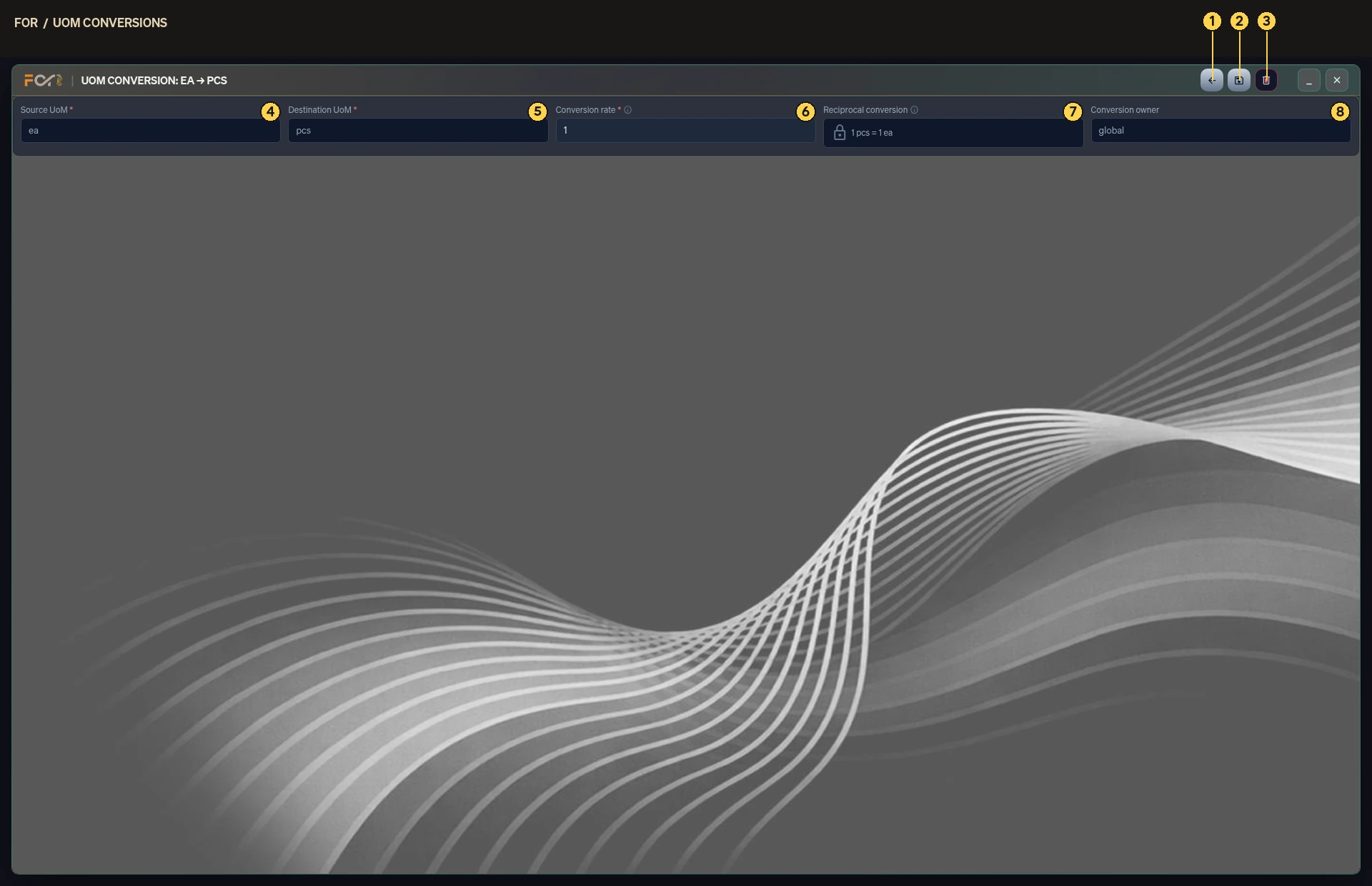
- 1
Back to list · left arrow
Return to the current document list. If the form has unsaved changes, decide explicitly whether to keep working or discard them. Going back is not Save and does not reverse a completed operation.
- 2
Save · disk
Validate and save the current form. On an accounting document this can post the financial transaction; on an operational draft it saves that stage only. Read the success or error message and final number. If the outcome is uncertain, reload/reconcile the same document instead of creating another.
- 3
Deactivate / Archive · trash
Remove the record from ordinary active choices while retaining its history. This is not a financial reversal. Project tags and budgets are archived with their historical assignments/amounts retained. Review the confirmation and any dependency warning; connected-bank accounts and protected tax/system choices may not be deactivated.
- 4
Source UoM
Read the unit attached to this quantity. Stock/sales and component quantities use the stock unit; purchase/make quantities may use a different reviewed unit. Source-linked documents retain their original conversion, so a later catalogue change does not reinterpret past quantities.
- 5
Destination UoM
Read the unit attached to this quantity. Stock/sales and component quantities use the stock unit; purchase/make quantities may use a different reviewed unit. Source-linked documents retain their original conversion, so a later catalogue change does not reinterpret past quantities.
- 6
Conversion rate
State whether the conversion is general or specific to the selected product, and verify the direction. For example, one case to twelve each is different from one each to a case. The reciprocal is the inverse, not an additional quantity multiplier.
- 7
Reciprocal conversion
State whether the conversion is general or specific to the selected product, and verify the direction. For example, one case to twelve each is different from one each to a case. The reciprocal is the inverse, not an additional quantity multiplier.
- 8
Conversion owner
State whether the conversion is general or specific to the selected product, and verify the direction. For example, one case to twelve each is different from one each to a case. The reciprocal is the inverse, not an additional quantity multiplier. Choices: Shared physical units; Product or service; Inventory item.
Complete the task
Define an explicit conversion between stock and purchase/make units without rewriting historical quantities.
- Search the existing list and open the intended record before choosing New; review the exact field reference below.
- Complete the required choices and review their business effect, then Save only when the form is editable and the values are correct.
- Reopen the saved result and follow the linked workflow rather than making disconnected duplicates.
Saved, read-only and unavailable states
The saved record and its source workflow determine which fields can change. Read-only values stay visible for review; they are not broken inputs. Save/discard unsaved edits before an action that requires a clean source. If the result of an operation is uncertain, inspect and reconcile that same operation rather than repeating a new write.
Every field and control
Use the exact label or hover over an icon to match it to this reference. A missing action is not the same as an empty field: check its availability below.
Search · magnifying glass
ActionSearch this company's selected list by the visible document number, business name or descriptive words. Confirm the active company first. Search results do not widen your role permissions; clear the search to return to the ordinary filtered list.
Availability: List and lookup views. A source-specific picker can intentionally offer fewer records than the full list.
Include retained inactive/completed records when the list offers this control. Open order views exclude Draft, Closed and Cancelled; completed pick/pack tasks are normally found through Show inactive. Historical visibility does not reactivate or reopen a record.
Availability: Only when the list supports inactive or lifecycle filtering; choices depend on the document type.
Previous / Next / page size
ActionMove through the current filtered result set. The count refers to those filters, not the whole company. Changing filters starts a new result set; a short page does not by itself prove that unrelated records do not exist.
Availability: Paged lists; Previous/Next is disabled when no page exists in that direction.
Open a row
ActionSelect the record's main name/number to open its form. Email and phone links have their own communication actions. A linked count or financial balance can open the corresponding transaction rail rather than edit that total.
Availability: Requires permission to open the record. Reference-only roles receive only the permitted context.
Back to list · left arrow
ActionReturn to the current document list. If the form has unsaved changes, decide explicitly whether to keep working or discard them. Going back is not Save and does not reverse a completed operation.
Availability: Ordinary forms; a guided batch or specialized workflow can manage navigation itself.
Minimize · minus
ActionKeep this workspace open as a colored taskbar tile. Select that tile to restore the same window. Minimizing is not Save and does not cancel an operation already submitted.
Availability: Hosted workspace windows.
Close window · X
ActionClose this window, not the underlying record. Respect any unsaved-change or unfinished-operation warning. Closing a window never reverses a posted document, dispatched shipment or sent email.
Availability: Hosted workspace windows; an active workflow can require waiting or confirming navigation.
New · plus
ActionOpen a new form in the selected company. Check required identity fields, default date, currency and number before entering details. Opening a form is not confirmation of a completed transaction.
Availability: Only for records that can be authored directly and for users with create permission. System activity records have no standalone New.
Save · disk
ActionValidate and save the current form. On an accounting document this can post the financial transaction; on an operational draft it saves that stage only. Read the success or error message and final number. If the outcome is uncertain, reload/reconcile the same document instead of creating another.
Availability: Editable records with write permission; disabled while loading/saving or when a required dependency is unresolved.
Deactivate / Archive · trash
ActionRemove the record from ordinary active choices while retaining its history. This is not a financial reversal. Project tags and budgets are archived with their historical assignments/amounts retained. Review the confirmation and any dependency warning; connected-bank accounts and protected tax/system choices may not be deactivated.
Availability: Saved editable records only where the action is offered; protected, standard or workflow-owned records can hide or refuse it.
Open eligible choices for this exact field. Search by code/name and inspect the secondary description and badges. Product code matches take priority; Inventory, Non-inventory and Internal only explain eligibility, not interchangeable products.
Availability: Reference fields. Results can depend on customer/supplier, currency, warehouse, source line, active status and your role.
Open selected record
ActionOpen the selected customer, supplier, product, account or source document in its own workspace. Its category color follows the destination. This is navigation, not confirmation of the unsaved current form.
Availability: A resolved reference and permission to open it are required; read-only reference access does not grant master editing.
Clear selection · X
ActionRemove an editable field's current selection. It does not delete the referenced customer/product/document. Changing a party, currency or control account can require confirmation before incompatible draft applications are cleared.
Availability: Only editable, clearable selections; source-owned or required locked references stay protected.
Source UoM
ColumnRead the unit attached to this quantity. Stock/sales and component quantities use the stock unit; purchase/make quantities may use a different reviewed unit. Source-linked documents retain their original conversion, so a later catalogue change does not reinterpret past quantities.
Availability: Read-only display; inspect the originating workflow to change its result.
Destination UoM
ColumnRead the unit attached to this quantity. Stock/sales and component quantities use the stock unit; purchase/make quantities may use a different reviewed unit. Source-linked documents retain their original conversion, so a later catalogue change does not reinterpret past quantities.
Availability: Read-only display; inspect the originating workflow to change its result.
Conversion rate
ColumnState whether the conversion is general or specific to the selected product, and verify the direction. For example, one case to twelve each is different from one each to a case. The reciprocal is the inverse, not an additional quantity multiplier.
Availability: Read-only display; inspect the originating workflow to change its result.
Product or service
ColumnRead this saved-record summary before opening the row. Use the full form for the field's context and related documents; a list summary is not an editable posting field.
Availability: Read-only display; inspect the originating workflow to change its result.
Inventory item
ColumnRead this saved-record summary before opening the row. Use the full form for the field's context and related documents; a list summary is not an editable posting field.
Availability: Read-only display; inspect the originating workflow to change its result.
Source UoM
FieldRead the unit attached to this quantity. Stock/sales and component quantities use the stock unit; purchase/make quantities may use a different reviewed unit. Source-linked documents retain their original conversion, so a later catalogue change does not reinterpret past quantities. Choices: Pieces; Each; Unit; Box; Carton; Pallet; Pack; Set; Pair; Roll; Sheet; Kilogram; Gram; Tonne; Pound; Ounce; Litre; Millilitre; Gallon; Metre; Centimetre; Millimetre; Inch; Foot; Square metre; Cubic metre; Hour; Day.
Availability: Required when this field is offered for an editable record.
Destination UoM
FieldRead the unit attached to this quantity. Stock/sales and component quantities use the stock unit; purchase/make quantities may use a different reviewed unit. Source-linked documents retain their original conversion, so a later catalogue change does not reinterpret past quantities. Choices: Pieces; Each; Unit; Box; Carton; Pallet; Pack; Set; Pair; Roll; Sheet; Kilogram; Gram; Tonne; Pound; Ounce; Litre; Millilitre; Gallon; Metre; Centimetre; Millimetre; Inch; Foot; Square metre; Cubic metre; Hour; Day.
Availability: Required when this field is offered for an editable record.
Conversion rate
FieldState whether the conversion is general or specific to the selected product, and verify the direction. For example, one case to twelve each is different from one each to a case. The reciprocal is the inverse, not an additional quantity multiplier.
Availability: Required when this field is offered for an editable record.
Reciprocal conversion
FieldState whether the conversion is general or specific to the selected product, and verify the direction. For example, one case to twelve each is different from one each to a case. The reciprocal is the inverse, not an additional quantity multiplier.
Availability: Read-only display; inspect the originating workflow to change its result.
Conversion owner
FieldState whether the conversion is general or specific to the selected product, and verify the direction. For example, one case to twelve each is different from one each to a case. The reciprocal is the inverse, not an additional quantity multiplier. Choices: Shared physical units; Product or service; Inventory item.
Availability: Editable only when your role, document state and the source workflow allow it; not every country or document variant shows this field.
Product or service
FieldSelect the existing financial product or service using the lookup, checking the displayed identity and context before choosing. The open-record icon reads the selected record when your role permits it; clear removes only the draft selection, not the referenced record.
Availability: Editable only when your role, document state and the source workflow allow it; not every country or document variant shows this field. Lookup results are limited to eligible records; a read-only lookup grants no editing permission.
Inventory item
FieldSelect the existing inventory product using the lookup, checking the displayed identity and context before choosing. The open-record icon reads the selected record when your role permits it; clear removes only the draft selection, not the referenced record.
Availability: Editable only when your role, document state and the source workflow allow it; not every country or document variant shows this field. Lookup results are limited to eligible records; a read-only lookup grants no editing permission.