
Review and match bank movements
Start from one downloaded movement and reconcile its full amount against existing records or explicitly reviewed missing transactions.
Open this screen
FOR:EXCHANGE → select an account → its transaction list.
When it is available
Available to users whose company roles permit this work. Country, subscription, company settings and the saved record's state can narrow the available controls.
QuickBooks connection
In FOR:LEDGER, supported saved accounting records are sent to QuickBooks Online and supported QuickBooks changes are synchronized back to FOR. Opening a list or preparing an unsaved form does not create a QuickBooks transaction. Synchronization is not guaranteed to be immediate or complete: verify the saved document and its status in FOR. FOR remains your accounting system of record under the Terms. FOR:CEO records the same work in FOR only.
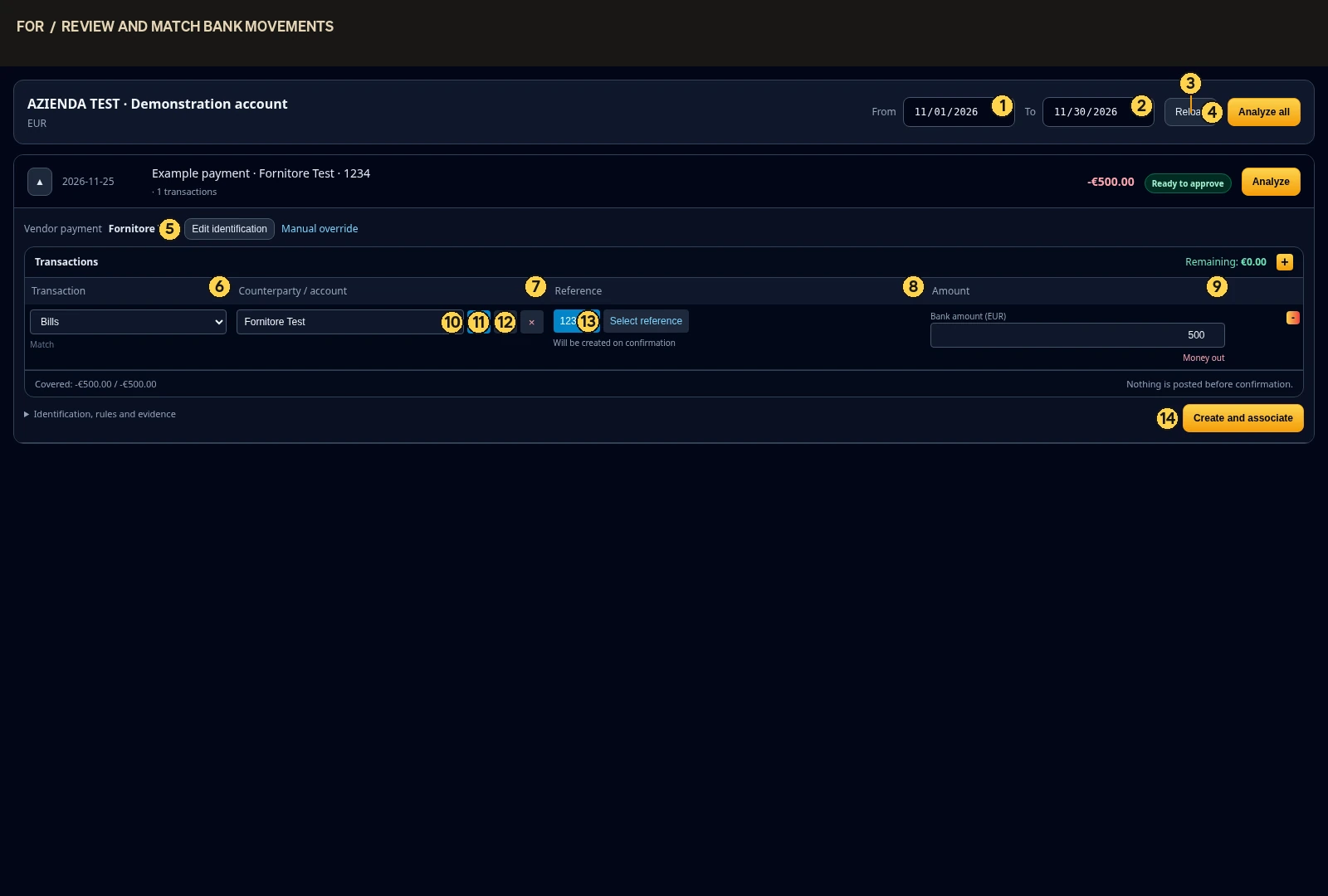
- 1
From
Start of the bank-movement date window. Narrow large windows before bulk analysis when the source list is incomplete.
- 2
To
End of the selected movement window, in the account's context. Changing the window does not change a movement's recorded date.
- 3
Reload
Read current movements and drafts for the selected dates. Do not use reload as a blind replay of an uncertain confirmation.
- 4
Analyze / Analyze all
Prepare suggestions for one movement or the eligible movements in the current date window, not just the expanded rows. Incomplete source loading disables bulk analysis. Suggestions are not final approval; review each remainder and preserved manual choice.
- 5
Edit identification
Correct the proposed business intent and party/account without posting the bank movement.
- 6
Transaction / Transaction type
Choose Bills, Invoices, Expense or Transfer for an editable component. A proposed type must agree with the actual bank movement and underlying evidence.
- 7
Counterparty / account
Choose the actual vendor/customer for bills/invoices or the eligible account for an expense/transfer. Select the party before choosing its references.
- 8
Reference
Read every selected source document or existing cash record. A document link opens its form; the number alone is not proof of a full payment.
- 9
Amount
Read the signed contribution in bank currency and any separately shown source-currency settlement amount. Do not replace a foreign amount with an unconverted bank figure.
- 10
Search
Open the context-appropriate party/account picker. Changing the choice requires reviewing its dependent document references again.
- 11
Open in Orca
Open the selected permitted master record without changing the association.
- 12
Clear
Clear only this editable selection and review the resulting missing-details state.
- 13
Select reference / Select existing
Choose the eligible party-scoped bill, invoice or recorded cash item. Respect its remaining available amount.
- 14
Confirm association / Create and associate
Match existing records and create only the explicitly prepared missing pieces after balances and total are rechecked. The label changes when new transactions are included.
How to work here
Start from one downloaded movement and reconcile its full amount against existing records or explicitly reviewed missing transactions.
- Filter the account, date range and processing status; inspect the original narrative, signed amount and currency.
- Run analysis for one row or the displayed batch when offered. Existing recorded cash is matched before creating another payment; a partial match leaves a visible remainder.
- Expand the grey arrow and review Bills, Invoices, Expense or Transfer components. Choose the party before its document picker and distinguish Unpaid from Already paid.
- Complete missing references/accounts and reconcile the signed total, then explicitly confirm. For an already-recorded transaction, match it rather than creating it again.
- Follow View created or Bank movements from the accounting document. Unmatching releases associations; it does not erase the original payment/expense/transfer.
Every field and control
Use the exact label or hover over an icon to match it to this reference. A missing action is not the same as an empty field: check its availability below.
Analyze / Analyze all
ActionPrepare suggestions for one movement or the eligible movements in the current date window, not just the expanded rows. Incomplete source loading disables bulk analysis. Suggestions are not final approval; review each remainder and preserved manual choice.
Availability: Only when offered by the current screen, role and saved workflow state. Read any confirmation before proceeding.
Stop analysis
ActionStop future analysis work. Completed suggestions remain; this does not cancel a financial confirmation already underway.
Availability: Only when offered by the current screen, role and saved workflow state. Read any confirmation before proceeding.
Expand movement · grey arrow
ActionShow the component composition beneath the source movement.
Availability: Only when offered by the current screen, role and saved workflow state. Read any confirmation before proceeding.
Add / remove component
ActionPrepare or remove an editable matching row; it does not delete the referenced accounting transaction.
Availability: Only when offered by the current screen, role and saved workflow state. Read any confirmation before proceeding.
New / Existing
ActionFor Expense/Transfer, choose whether the row refers to a real saved transaction or an explicitly reviewed missing one.
Availability: Only when offered by the current screen, role and saved workflow state. Read any confirmation before proceeding.
Unpaid / Already paid
ActionUnpaid offers eligible open documents; Already paid offers only remaining unassociated recorded cash.
Availability: Only when offered by the current screen, role and saved workflow state. Read any confirmation before proceeding.
Match existing records and create only the explicitly prepared missing pieces after balances and total are rechecked. The label changes when new transactions are included.
Availability: Only when offered by the current screen, role and saved workflow state. Read any confirmation before proceeding.
Unmatch
ActionRelease the link using the offered reviewed action. Original accounting is not deleted by unlinking.
Availability: Only when offered by the current screen, role and saved workflow state. Read any confirmation before proceeding.
Save / review rule
ActionApprove a stable counterparty/account rule only after checking its scope. Rules do not override permissions, actual cash or source ownership.
Availability: Only when offered by the current screen, role and saved workflow state. Read any confirmation before proceeding.
View original
ActionRead the downloaded source evidence independently of a suggested accounting result.
Availability: Only when offered by the current screen, role and saved workflow state. Read any confirmation before proceeding.
View created
ActionOpen the actual confirmed target document. An absent link or uncertain state must be investigated, not replaced by another write.
Availability: Only when offered by the current screen, role and saved workflow state. Read any confirmation before proceeding.
From
FieldStart of the bank-movement date window. Narrow large windows before bulk analysis when the source list is incomplete.
Availability: Shown when the corresponding workflow and your permissions allow it; review required markers and any disabled-state explanation.
To
FieldEnd of the selected movement window, in the account's context. Changing the window does not change a movement's recorded date.
Availability: Shown when the corresponding workflow and your permissions allow it; review required markers and any disabled-state explanation.
Choose Bills, Invoices, Expense or Transfer for an editable component. A proposed type must agree with the actual bank movement and underlying evidence.
Availability: Shown when the corresponding workflow and your permissions allow it; review required markers and any disabled-state explanation.
Counterparty / account
FieldChoose the actual vendor/customer for bills/invoices or the eligible account for an expense/transfer. Select the party before choosing its references.
Availability: Shown when the corresponding workflow and your permissions allow it; review required markers and any disabled-state explanation.
Reference
FieldRead every selected source document or existing cash record. A document link opens its form; the number alone is not proof of a full payment.
Availability: Shown when the corresponding workflow and your permissions allow it; review required markers and any disabled-state explanation.
Amount
FieldRead the signed contribution in bank currency and any separately shown source-currency settlement amount. Do not replace a foreign amount with an unconverted bank figure.
Availability: Shown when the corresponding workflow and your permissions allow it; review required markers and any disabled-state explanation.
Remaining
FieldThe still-uncovered bank amount. Confirmation needs an exactly balanced, verified composition; a convenient zero typed elsewhere does not resolve missing evidence.
Availability: Shown when the corresponding workflow and your permissions allow it; review required markers and any disabled-state explanation.
Covered
FieldCompare the component total with the bank movement. A collection-clearing leg is not counted twice as another income/payment.
Availability: Shown when the corresponding workflow and your permissions allow it; review required markers and any disabled-state explanation.
Explicitly allow a combination involving more than one party when the real bank movement supports it. Otherwise keep the matching scope narrow.
Availability: Shown when the corresponding workflow and your permissions allow it; review required markers and any disabled-state explanation.
Reload
ActionRead current movements and drafts for the selected dates. Do not use reload as a blind replay of an uncertain confirmation.
Availability: Only when offered by the current screen, role and saved workflow state. Read any confirmation before proceeding.
Edit identification
ActionCorrect the proposed business intent and party/account without posting the bank movement.
Availability: Only when offered by the current screen, role and saved workflow state. Read any confirmation before proceeding.
Add transaction
ActionAdd an editable component to cover the remaining amount. Managed payouts and owned historical cash can restrict this action.
Availability: Only when offered by the current screen, role and saved workflow state. Read any confirmation before proceeding.
Remove transaction
ActionRemove this draft component, not its underlying posted accounting document.
Availability: Only when offered by the current screen, role and saved workflow state. Read any confirmation before proceeding.
Search
ActionOpen the context-appropriate party/account picker. Changing the choice requires reviewing its dependent document references again.
Availability: Only when offered by the current screen, role and saved workflow state. Read any confirmation before proceeding.
Open in Orca
ActionOpen the selected permitted master record without changing the association.
Availability: Only when offered by the current screen, role and saved workflow state. Read any confirmation before proceeding.
Clear
ActionClear only this editable selection and review the resulting missing-details state.
Availability: Only when offered by the current screen, role and saved workflow state. Read any confirmation before proceeding.
Choose the eligible party-scoped bill, invoice or recorded cash item. Respect its remaining available amount.
Availability: Only when offered by the current screen, role and saved workflow state. Read any confirmation before proceeding.
Remember this handling
ActionReview the scope of the proposed handling rule before saving it. It must not silently override a different party or a manual choice.
Availability: Only when offered by the current screen, role and saved workflow state. Read any confirmation before proceeding.
Collection settlement
ActionUse an eligible clearing account for a real grouped settlement, keeping its net movement and component total reconciled without duplicate income.
Availability: Only when offered by the current screen, role and saved workflow state. Read any confirmation before proceeding.
Reapply layers
ActionRefresh the applicable handling suggestions after deliberate review. Preserved manual overrides and verified existing cash still matter.
Availability: Only when offered by the current screen, role and saved workflow state. Read any confirmation before proceeding.
Expense tax code
ActionFor a new eligible expense component, select the real tax treatment. Matching an existing transaction does not retax it.
Availability: Only when offered by the current screen, role and saved workflow state. Read any confirmation before proceeding.
Reconcile original operation
ActionResolve an interrupted or uncertain confirmation through its existing operation. Do not start a replacement payment while its outcome is unknown.
Availability: Only when offered by the current screen, role and saved workflow state. Read any confirmation before proceeding.