
Document numbers
Choose prospective numbering rules without renumbering history. Supplier bills/credits retain the supplier's own reference.
Open this screen
Sidebar → Settings → Document numbers.
When it is available
Available to users whose company roles permit this work. Country, subscription, company settings and the saved record's state can narrow the available controls.
QuickBooks connection
This screen prepares or displays work in FOR; opening it does not write to QuickBooks. Where a later step creates an accounting document, that step is identified separately. FOR:CEO never sends its accounting entries to QuickBooks.
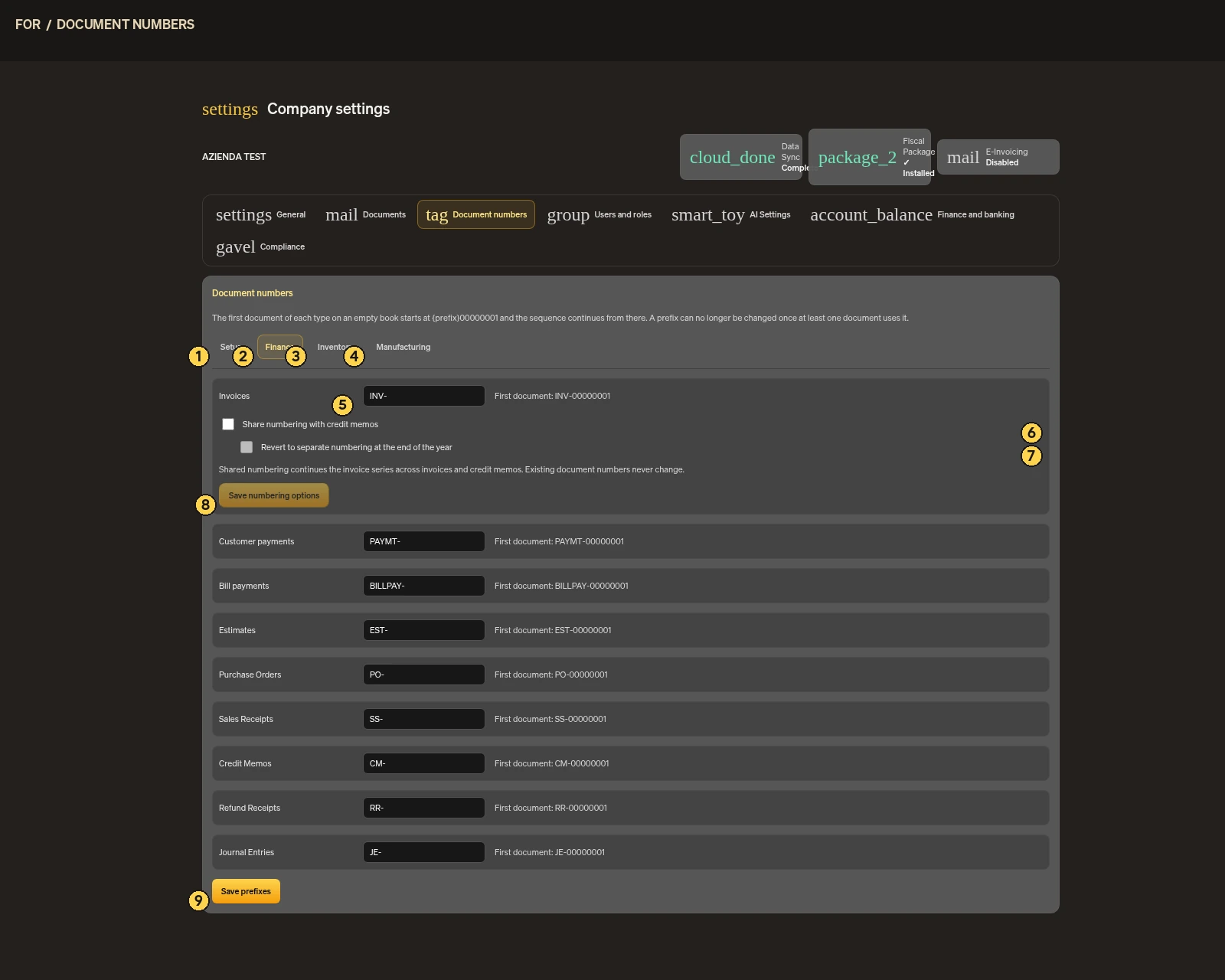
- 1
Setup
Choose prefixes for the offered master/setup objects. These are separate from financial document numbers.
- 2
Finance
Choose prefixes for self-issued financial documents. Supplier bills and vendor credit references belong to the supplier and are not renumbered here.
- 3
Inventory
Choose operational inventory-document prefixes, not accounting invoice or stock-product identities.
- 4
Manufacturing
Choose the available production-document and manufactured tracking prefixes. Existing lot/serial labels are retained.
- 5
Document-type prefix
Review the prefix for each self-issued type. A used prefix can be protected; supplier document references are not replaced by outgoing numbering.
- 6
Share numbering with credit memos
Use the invoice counter for both document types within the same series, while preserving distinct custom formats when configured.
- 7
Revert to separate numbering at the end of the year
Read the displayed document-date boundary. Earlier dates keep the shared series; later dates use the separate configured counters/prefixes.
- 8
Save numbering options
Disabled in this example. Save the invoice/credit-note sharing and custom-series choices in this panel. This is separate from the document-prefix Save button.
- 9
Save prefixes
Save the prefix choices in the selected category. Review protected, already-used prefixes; this does not renumber historical documents.
How to work here
Choose prospective numbering rules without renumbering history. Supplier bills/credits retain the supplier's own reference.
- Choose Finance, Inventory, Manufacturing or Setup and review the used-prefix restrictions before changing a prefix.
- For custom sales numbering, review invoice/credit formats, padding, shared series and annual restart boundary. A location-specific series applies only to documents selecting that location.
- Save the rule and verify a new draft's proposed number and the final saved result. Disabled or issued historic numbers remain occupied.
Every field and control
Use the exact label or hover over an icon to match it to this reference. A missing action is not the same as an empty field: check its availability below.
Document-type prefix
FieldReview the prefix for each self-issued type. A used prefix can be protected; supplier document references are not replaced by outgoing numbering.
Availability: Shown when the corresponding workflow and your permissions allow it; review required markers and any disabled-state explanation.
Read the displayed document-date boundary. Earlier dates keep the shared series; later dates use the separate configured counters/prefixes.
Availability: Shown when the corresponding workflow and your permissions allow it; review required markers and any disabled-state explanation.
Review the displayed starting year. A year token by itself does not reset a counter; existing issued/reserved numbers remain occupied.
Availability: Shown when the corresponding workflow and your permissions allow it; review required markers and any disabled-state explanation.
Custom numbering
FieldUse the offered {number}, {location}, {yy} and {yyyy} placeholders with valid padding. Examples show a format, not a reservation of the next number.
Availability: Shown when the corresponding workflow and your permissions allow it; review required markers and any disabled-state explanation.
Choose an existing active Location for its independent series; documents without a matching series use the default. Sharing applies within each series.
Availability: Shown when the corresponding workflow and your permissions allow it; review required markers and any disabled-state explanation.
Set defaults for future final-operation tracking labels. This does not rename previously manufactured units.
Availability: Shown when the corresponding workflow and your permissions allow it; review required markers and any disabled-state explanation.
Add location series
ActionAdd an unused active location and review both invoice and credit formats.
Availability: Only when offered by the current screen, role and saved workflow state. Read any confirmation before proceeding.
Remove location series
ActionReview prospective numbering before removal; historical documents are not renamed.
Availability: Only when offered by the current screen, role and saved workflow state. Read any confirmation before proceeding.
Save numbering
ActionSave the reviewed rule and read validation messages before issuing a new document.
Availability: Only when offered by the current screen, role and saved workflow state. Read any confirmation before proceeding.
Save numbering options
ActionSave the invoice/credit-note sharing and custom-series choices in this panel. This is separate from the document-prefix Save button.
Availability: Only when offered by the current screen, role and saved workflow state. Read any confirmation before proceeding.
Save prefixes
ActionSave the prefix choices in the selected category. Review protected, already-used prefixes; this does not renumber historical documents.
Availability: Only when offered by the current screen, role and saved workflow state. Read any confirmation before proceeding.
Setup
ActionChoose prefixes for the offered master/setup objects. These are separate from financial document numbers.
Availability: Only when offered by the current screen, role and saved workflow state. Read any confirmation before proceeding.
Finance
ActionChoose prefixes for self-issued financial documents. Supplier bills and vendor credit references belong to the supplier and are not renumbered here.
Availability: Only when offered by the current screen, role and saved workflow state. Read any confirmation before proceeding.
Inventory
ActionChoose operational inventory-document prefixes, not accounting invoice or stock-product identities.
Availability: Only when offered by the current screen, role and saved workflow state. Read any confirmation before proceeding.
Manufacturing
ActionChoose the available production-document and manufactured tracking prefixes. Existing lot/serial labels are retained.
Availability: Only when offered by the current screen, role and saved workflow state. Read any confirmation before proceeding.