
Self-invoicing
Review eligible purchase sources and the exact self-invoice treatment before sending. The reviewed document is distinct from the original supplier bill.
Open this screen
Command launcher → Compliance → Self-invoicing, or its Koaila home shortcut.
When it is available
Available to users whose company roles permit this work. Country, subscription, company settings and the saved record's state can narrow the available controls.
QuickBooks connection
This screen prepares or displays work in FOR; opening it does not write to QuickBooks. Where a later step creates an accounting document, that step is identified separately. FOR:CEO never sends its accounting entries to QuickBooks.
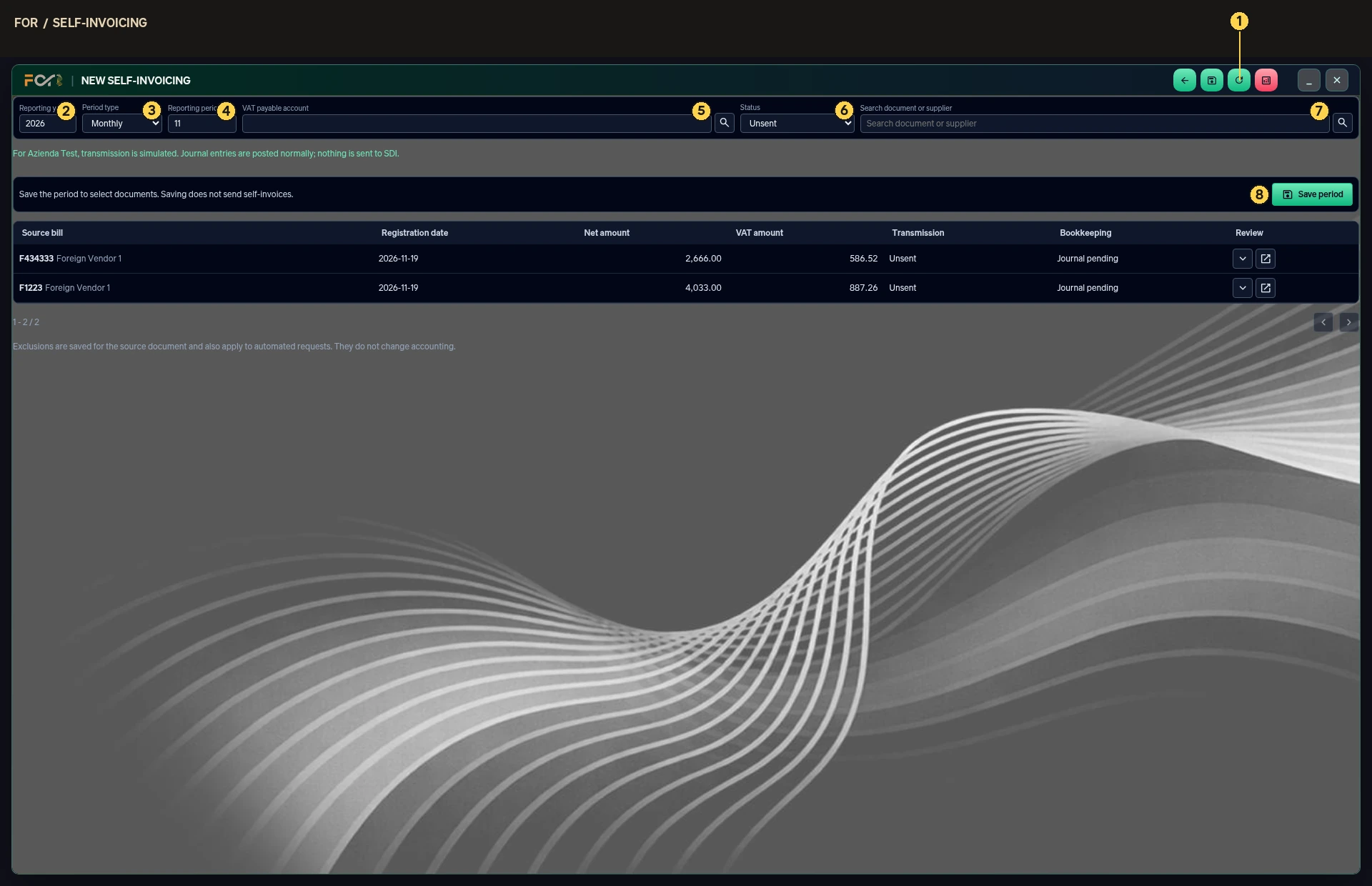
- 1
Refresh
Read current review state; resolve unsaved classifications before changing pages or refreshing.
- 2
Reporting year
Choose the year of the source review. A saved period keeps its identity; open another period rather than relabeling existing evidence.
- 3
Period type
Choose Monthly or Quarterly before setting the period number. This selects the review window, not the invoice transmission date.
- 4
Reporting period
Use 1–12 for months or 1–4 for quarters. Save the period before selecting its documents.
- 5
VAT payable account
Review the detected liability account or choose an eligible account with the lookup. It is required by the offered bookkeeping path; selecting it does not generate a journal or send an electronic invoice.
- 6
Section / status / search
Narrow the current review without changing source documents or classifying unseen rows.
- 7
Search document or supplier
Enter the specific source number or supplier and run Search within the selected period and status.
- 8
Save period / Prepare / Continue preparation
Prepare the period's review with its recorded progress. A partial preparation must finish before a complete export can be claimed.
How to work here
Review eligible purchase sources and the exact self-invoice treatment before sending. The reviewed document is distinct from the original supplier bill.
- Choose/save the period and inspect eligible source documents by registration date and supplier. Use status/search filters and page through the results.
- Expand Review self-invoice and check document type, taxable basis, virtual tax, totals and required VAT payable account. Foreign services, intra-EU goods and other reverse-charge cases are not interchangeable.
- Use Send reviewed self-invoice only when the preview permits it. Select multiple eligible sources and Review selected before a batch; Stop remaining batch stops future items, not already submitted documents.
- Check original operation for uncertain outcomes and reconcile that operation. Generate/continue journals only for the explicitly offered journal stage, not as a duplicate send.
Every field and control
Use the exact label or hover over an icon to match it to this reference. A missing action is not the same as an empty field: check its availability below.
Choose the actual review period. A registration/payment date basis can differ from document date; use the screen's stated basis.
Availability: Shown when the corresponding workflow and your permissions allow it; review required markers and any disabled-state explanation.
Narrow the current review without changing source documents or classifying unseen rows.
Availability: Shown when the corresponding workflow and your permissions allow it; review required markers and any disabled-state explanation.
Prepare the period's review with its recorded progress. A partial preparation must finish before a complete export can be claimed.
Availability: Only when offered by the current screen, role and saved workflow state. Read any confirmation before proceeding.
Refresh
ActionRead current review state; resolve unsaved classifications before changing pages or refreshing.
Availability: Only when offered by the current screen, role and saved workflow state. Read any confirmation before proceeding.
Open source document
ActionOpen the actual source when your role permits; read-only review does not grant ordinary accounting edits.
Availability: Only when offered by the current screen, role and saved workflow state. Read any confirmation before proceeding.
Review export
ActionDownload the supported reviewed result, retaining the chosen company and period. This is not automatic submission to a tax authority.
Availability: Only when offered by the current screen, role and saved workflow state. Read any confirmation before proceeding.
Previous / Next
ActionReview all pages; pending row edits can block navigation so they are not lost.
Availability: Only when offered by the current screen, role and saved workflow state. Read any confirmation before proceeding.
Select row / Clear selection
ActionChoose the sources for a reviewed batch; selection alone does not authorize sending.
Availability: Only when offered by the current screen, role and saved workflow state. Read any confirmation before proceeding.
Inspect the complete source-bound preview before one or more submissions.
Availability: Only when offered by the current screen, role and saved workflow state. Read any confirmation before proceeding.
Send reviewed self-invoice
ActionExplicitly submit the approved preview when the screen confirms eligibility.
Availability: Only when offered by the current screen, role and saved workflow state. Read any confirmation before proceeding.
Record the required business reason for exclusion or restoration; this does not delete the supplier bill or revoke an already-sent document.
Availability: Only when offered by the current screen, role and saved workflow state. Read any confirmation before proceeding.
Resolve the same submitted operation after a missing response; do not create another self-invoice as a test.
Availability: Only when offered by the current screen, role and saved workflow state. Read any confirmation before proceeding.
Complete only the pending accounting stage offered by the reviewed operation, preserving the original submission.
Availability: Only when offered by the current screen, role and saved workflow state. Read any confirmation before proceeding.
Stop remaining batch
ActionStop future batch items. Already completed or submitted items remain real and require their own review.
Availability: Only when offered by the current screen, role and saved workflow state. Read any confirmation before proceeding.
Reporting year
FieldChoose the year of the source review. A saved period keeps its identity; open another period rather than relabeling existing evidence.
Availability: Shown when the corresponding workflow and your permissions allow it; review required markers and any disabled-state explanation.
Period type
FieldChoose Monthly or Quarterly before setting the period number. This selects the review window, not the invoice transmission date.
Availability: Shown when the corresponding workflow and your permissions allow it; review required markers and any disabled-state explanation.
Reporting period
FieldUse 1–12 for months or 1–4 for quarters. Save the period before selecting its documents.
Availability: Shown when the corresponding workflow and your permissions allow it; review required markers and any disabled-state explanation.
VAT payable account
FieldReview the detected liability account or choose an eligible account with the lookup. It is required by the offered bookkeeping path; selecting it does not generate a journal or send an electronic invoice.
Availability: Shown when the corresponding workflow and your permissions allow it; review required markers and any disabled-state explanation.
Status
FieldChoose Unsent, Submitted / history, Show excluded, All documents or Operation history. Excluded and already-submitted documents remain separate from new eligible work.
Availability: Shown when the corresponding workflow and your permissions allow it; review required markers and any disabled-state explanation.
Enter the specific source number or supplier and run Search within the selected period and status.
Availability: Shown when the corresponding workflow and your permissions allow it; review required markers and any disabled-state explanation.
Select account
ActionChoose the actual VAT payable account from the eligible account list; do not create a new arbitrary account merely to remove a warning.
Availability: Only when offered by the current screen, role and saved workflow state. Read any confirmation before proceeding.
Search
ActionApply the document/supplier search without preparing or sending another self-invoice.
Availability: Only when offered by the current screen, role and saved workflow state. Read any confirmation before proceeding.
Watch the workflow

This recording is temporarily unavailable. Please try again later.
Italian fiscal workflow
Italian self-invoices and reverse charge
Read the steps
- Review source transactions eligible for supported self-invoicing.
- Follow the resulting electronic-invoice status.