
Finance and banking settings
Review payment defaults, bank/document choices, accounting preferences and eligible SEPA or book-closure settings.
Open this screen
Sidebar → Settings → Finance and banking.
When it is available
Available to users whose company roles permit this work. Country, subscription, company settings and the saved record's state can narrow the available controls.
QuickBooks connection
This screen prepares or displays work in FOR; opening it does not write to QuickBooks. Where a later step creates an accounting document, that step is identified separately. FOR:CEO never sends its accounting entries to QuickBooks.
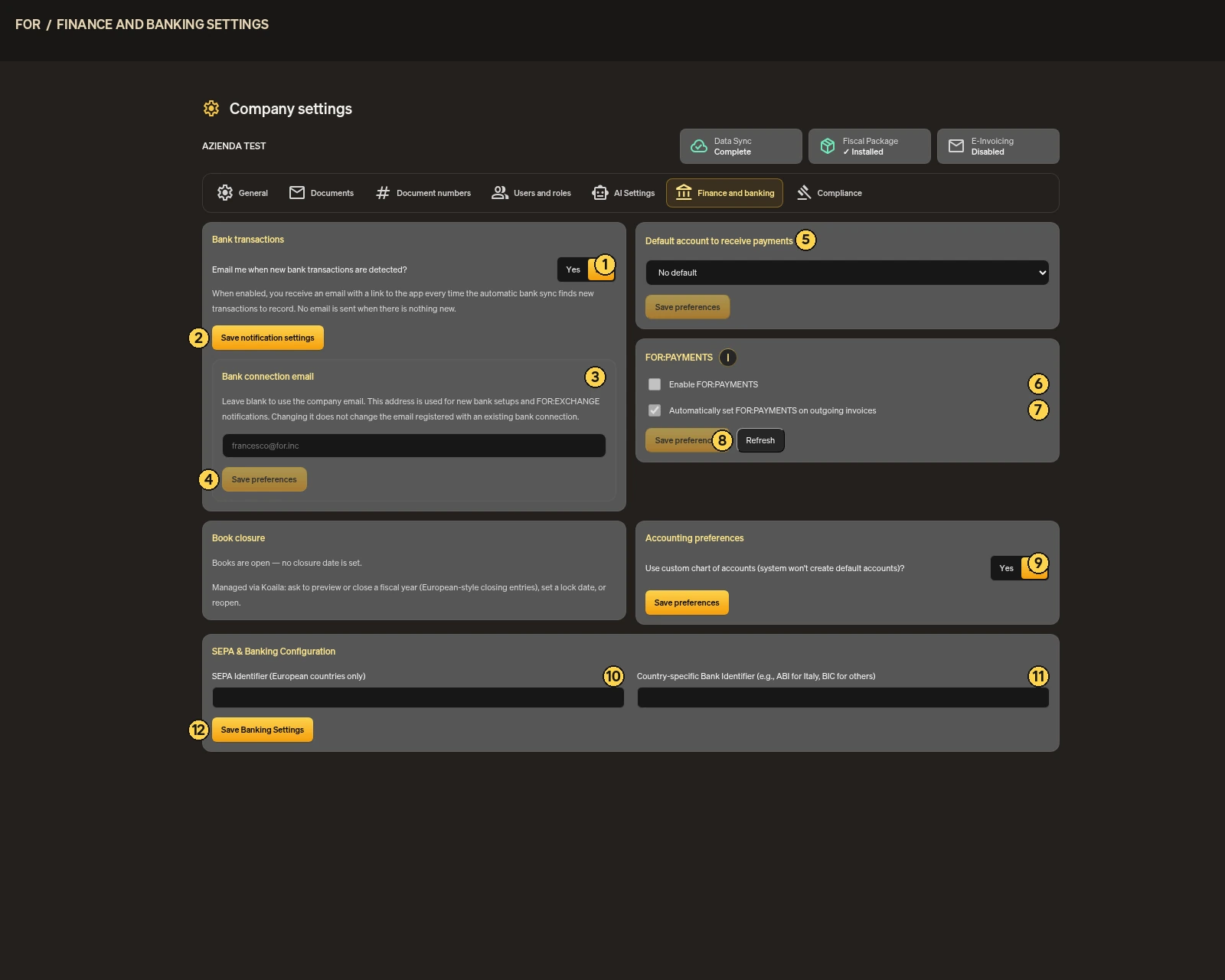
- 1
Email me when new bank transactions are detected?
Notify configured recipients when new movements arrive; no new-movement email is needed when nothing arrived.
- 2
Save notification settings
Save the new-bank-movement notification preference, not bank credentials or accounting associations.
- 3
Bank connection email
Choose the company contact used for bank-connection communications. It is not the bank login, an invoice recipient or permission to move money.
- 4
Save preferences
Disabled in this example. Save only the reviewed preference in the surrounding section. Several panels have their own Save preferences button; check the heading before saving.
- 5
Default account to receive payments
Select an eligible active leaf cash/bank or cash-holding account in home currency. It prefills new Customer Payment forms, including foreign-currency collections; explicit choices win.
- 6
Enable FOR:PAYMENTS
Enable the available invoice-payment service only after reviewing its setup, eligibility and fees. Enabling it does not mark an invoice as paid.
- 7
Automatically set FOR:PAYMENTS on outgoing invoices
Choose the default for eligible future invoices. The actual payment status and settlement remain separate from this preference.
- 8
Refresh
Read the payment service's current setup/status. Refresh does not approve setup or create a customer payment.
- 9
Use custom chart of accounts
Choose whether automatic default-account setup should leave your established chart alone. It does not redefine existing account types.
- 10
SEPA Identifier
Use the actual company identifier required by the eligible SEPA workflow, not a bank account number.
- 11
Country-specific Bank Identifier
Supply the actual applicable bank identifier in the requested format; verify independently before submitting payment files.
- 12
Save Banking Settings
Save the reviewed SEPA and national identifiers. This does not upload or execute a bank payment file.
How to work here
Review payment defaults, bank/document choices, accounting preferences and eligible SEPA or book-closure settings.
- Choose the optional default account to receive customer payments from eligible home-currency cash/bank accounts without children. Clear an unavailable old default rather than assuming it still applies.
- Review online-payment setup separately from manually recording a payment. Set SEPA identifiers only where the country and payment-file workflow require them.
- For native companies, review the closing date and year-end process before locking books. Saving a preference is not approval of a closing journal.
Every field and control
Use the exact label or hover over an icon to match it to this reference. A missing action is not the same as an empty field: check its availability below.
Select an eligible active leaf cash/bank or cash-holding account in home currency. It prefills new Customer Payment forms, including foreign-currency collections; explicit choices win.
Availability: Shown when the corresponding workflow and your permissions allow it; review required markers and any disabled-state explanation.
Choose whether automatic default-account setup should leave your established chart alone. It does not redefine existing account types.
Availability: Shown when the corresponding workflow and your permissions allow it; review required markers and any disabled-state explanation.
Notify configured recipients when new movements arrive; no new-movement email is needed when nothing arrived.
Availability: Shown when the corresponding workflow and your permissions allow it; review required markers and any disabled-state explanation.
SEPA Identifier
FieldUse the actual company identifier required by the eligible SEPA workflow, not a bank account number.
Availability: Shown when the corresponding workflow and your permissions allow it; review required markers and any disabled-state explanation.
Supply the actual applicable bank identifier in the requested format; verify independently before submitting payment files.
Availability: Shown when the corresponding workflow and your permissions allow it; review required markers and any disabled-state explanation.
Bank connection email
FieldChoose the company contact used for bank-connection communications. It is not the bank login, an invoice recipient or permission to move money.
Availability: Shown when the corresponding workflow and your permissions allow it; review required markers and any disabled-state explanation.
Enable FOR:PAYMENTS
FieldEnable the available invoice-payment service only after reviewing its setup, eligibility and fees. Enabling it does not mark an invoice as paid.
Availability: Shown when the corresponding workflow and your permissions allow it; review required markers and any disabled-state explanation.
Choose the default for eligible future invoices. The actual payment status and settlement remain separate from this preference.
Availability: Shown when the corresponding workflow and your permissions allow it; review required markers and any disabled-state explanation.
Save notification settings
ActionSave the new-bank-movement notification preference, not bank credentials or accounting associations.
Availability: Only when offered by the current screen, role and saved workflow state. Read any confirmation before proceeding.
Save preferences
ActionSave only the reviewed preference in the surrounding section. Several panels have their own Save preferences button; check the heading before saving.
Availability: Only when offered by the current screen, role and saved workflow state. Read any confirmation before proceeding.
View FOR:PAYMENTS fees
ActionOpen the current fees disclosure before enabling payment collection. A guide example is not a binding payment-services quote.
Availability: Only when offered by the current screen, role and saved workflow state. Read any confirmation before proceeding.
Refresh
ActionRead the payment service's current setup/status. Refresh does not approve setup or create a customer payment.
Availability: Only when offered by the current screen, role and saved workflow state. Read any confirmation before proceeding.
Save Banking Settings
ActionSave the reviewed SEPA and national identifiers. This does not upload or execute a bank payment file.
Availability: Only when offered by the current screen, role and saved workflow state. Read any confirmation before proceeding.